



What you’ll learn in this article:
- Why JavaScript injection attacks succeed: Modern sites load 40+ third-party domains that traditional perimeter security tools cannot see, creating blind spots where malicious code executes undetected in the browser
- How to detect threats in real time: Behavioral analysis and continuous monitoring reduce detection time from months to minutes, meeting PCI DSS requirements 6.4.3 and 11.6.1
- A layered prevention framework: Five defense layers from secure development and Content Security Policy to runtime protection that control how code is built, loaded, and monitored
- Practical 4 week implementation: A focused roadmap for deploying continuous monitoring, script authorization workflows, and audit ready compliance evidence
Why Client-Side Attacks Are Rising
Most modern sites run significant third-party code in the user’s browser. The Web Almanac 2022 reports that the top 1,000 sites load an average of 43 third-party domains on mobile and 53 on desktop, expanding the surface for JavaScript injection attacks and supply-chain tampering.
In parallel, real e-commerce compromises continue to surface. Sansec has identified more than 70,000 websites that suffered Magecart e-skimming over time.
However, traditional perimeter tools do not see this browser-side activity, which is why PCI DSS 4.0.1 added explicit client-side controls. Requirement 6.4.3 for script authorization, integrity, and inventory on payment pages, and Requirement 11.6.1 for change/tamper detection with risk-based alerting
This guide explains how to prevent Cross-Site Scripting (XSS), detect Magecart, and strengthen client-side security with practical detection methods, prevention patterns, and automated processes.
Understanding JavaScript Injection Attacks
JavaScript injection occurs when untrusted code executes in the user’s browser. It is commonly enabled by weak input handling or unsafe script inclusion. OWASP lists Injection in the Top 10, noting that 94% of assessed applications were tested for some form of injection, with an incidence of up to 19%, and Cross-Site Scripting is part of this category. The core attack types include:
1. XSS: stored, reflected, Document Object Model-based (DOM)
Untrusted input is rendered as script and runs in the victim’s browser. DOM-based XSS occurs entirely on the client side via unsafe DOM APIs. OWASP (Open Worldwide Application Security Project) groups XSS under Injection due to similar root causes.
2. Magecart / digital skimming on payment forms
Malicious JavaScript captures cardholder data at checkout and exfiltrates it in real time. Notable cases include British Airways in 2018, where attackers injected skimming code and redirected data to a look-alike domain, impacting ~380,000 transactions; UK authorities later announced a hefty GDPR fine.
3. Supply-chain injection
Approved vendors or Content Delivery Network (CDNs) serve modified code. Polyfill.io is a recent example: after a change in ownership in early 2024, the service delivered malicious payloads to sites linking to the CDN, affecting a huge number of domains.
4. Tag-manager exploitation
Attackers hide skimmers within legitimate Google Tag Manager (GTM) containers, exploiting common allowlists and the trust of major domains. Public reporting shows hundreds of sites impacted in such campaigns.
Why do these attacks succeed
- Trust in third-party code: A single compromised vendor spreads attacker code at scale. The Polyfill.io event illustrates this risk.
- Limited runtime visibility: Server- and perimeter-level tools don’t see what scripts do in the browser. The 2024 report continues to highlight web applications as a prominent vector
- Silent script changes: CDN or tag-manager updates alter behavior without a merchant deployment.
What we’ve learned is that controlling where code comes from is necessary but not sufficient. To detect Magecart and broader JavaScript injection attacks, teams benefit from maintaining integrity evidence that aligns with PCI DSS 6.4.3 and 11.6.1.
Attack Anatomy
In our experience, these incidents follow a simple arc: entry through a weak input, unsafe DOM use, or a trusted third party. Here’s how these attacks unfold:
Entry
Adversaries find a foothold and inject code via vulnerable inputs, unsafe DOM Application Programming Interface (APIs), or a trusted third party. In the Ticketmaster case, attackers leveraged a modified Inbenta chatbot script that Ticketmaster had placed on the payments page.
Execution
The payload runs inside the shopper’s browser, hooking sensitive functions and form fields on the checkout path. Because this occurs client-side, traditional perimeter and server tools rarely see it.
Exfiltration
Captured data is transmitted to attacker-controlled endpoints that mimic legitimate services, often riding on approved third-party domains or CDNs.
For example, Monzo flagged unusual fraud patterns linked to Ticketmaster purchases in April 2018. Ticketmaster detected the breach on June 23 and disclosed it on June 27, indicating a material detection gap while the skimmer operated in browsers on the payment page.
Why Traditional Security Falls Short
Operationally, teams find that traditional security falls short because the gap is structural. Network firewalls and signature-based WAFs inspect server traffic; JavaScript injection succeeds in the browser. They cannot see what approved scripts do at runtime, which is where form hooks, DOM mutations, and silent exfiltration occur.
Two facts frame the risk. First, modern websites rely heavily on external code, often pulling in multiple third-party domains for each page, which increases the number of potential entry points for attacker code.
Second, the standards acknowledged this blind spot. PCI DSS 4.0/4.0.1 added explicit browser-side controls: 6.4.3 for script authorization, integrity, and inventory, and 11.6.1 for change- and tamper-detection with alerting on payment pages.
WAFs observe server traffic, and JavaScript runs in the browser. That visibility gap is where injections succeed. Static reviews cannot capture runtime behavior, and manual checks cannot keep up as third-party scripts change constantly.
Detection Strategies
Practically, the fastest path is effective detection that focuses on what actually runs in the browser and how it behaves. The following approaches are practical, measurable, and align with PCI DSS 6.4.3 and 11.6.1 expectations.
Behavioral analysis
Define what each script is allowed to do on high-value pages, then watch for drift. Track only the basics: which form fields a script reads and which network domains it talks to. Alert when a script touches payment inputs that have never been used before or begins sending data to a new endpoint.
Script integrity monitoring
Where files are stable, pin them with Subresource Integrity (SRI). For assets that change frequently or load via tag managers, maintain an approved list of script URLs and hashes, and alert on any unapproved changes. Pair this with a tight CSP so that only allowed sources can load.
Continuous monitoring
Observe pages continuously, not only at deployment. Coverage must include all payment pages and related user journeys. Centralize telemetry so security teams can see what was executed, where it ran, when it changed, and who reviewed the alert.
Ultimately, the success metric should be to reduce detection time. Move from months of silent exposure to alerts within minutes of a meaningful code or behavior change.
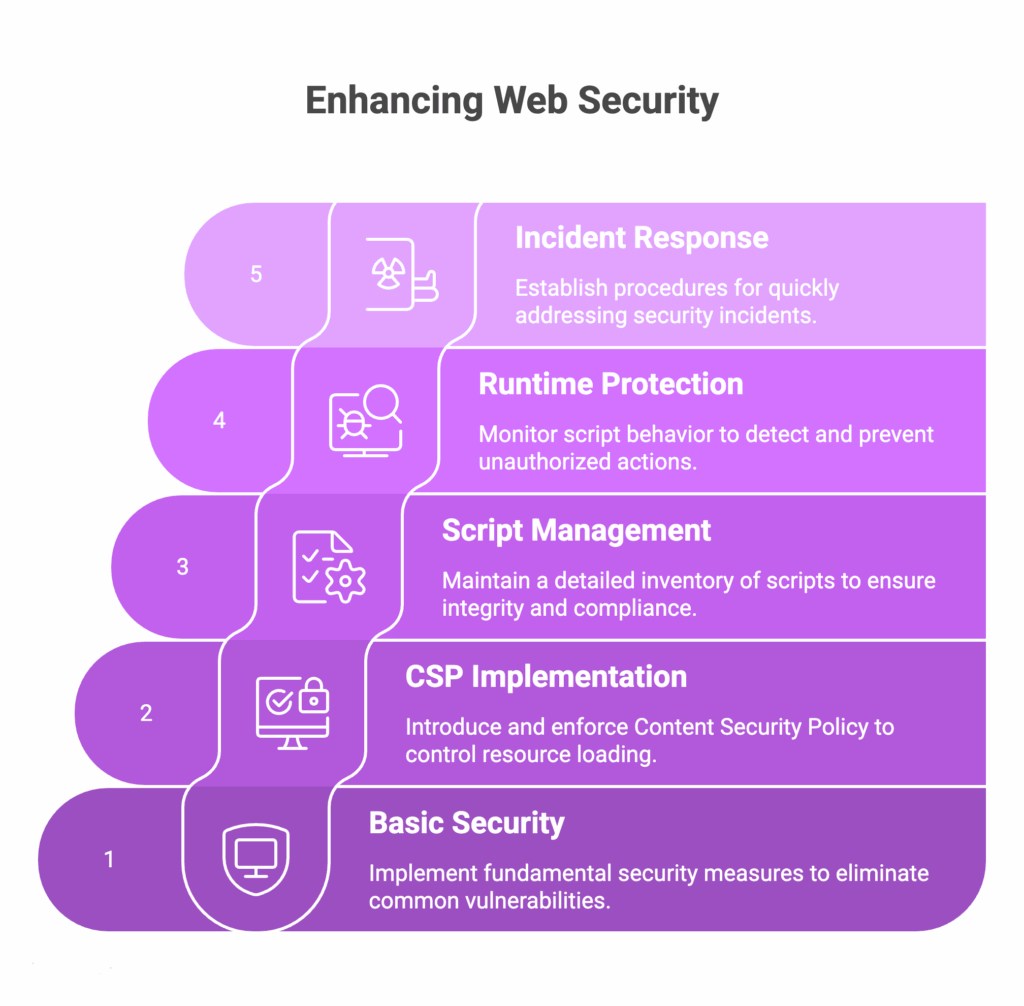
Prevention framework
What consistently works is durable defense that comes from layering controls that address how code is built, what is allowed to load, who owns it, how it behaves at runtime, and how you respond when it changes.
Layer 1: Secure development
Start with the basics that remove whole classes of bugs. Validate input for shape and length, but rely on context-aware output encoding to stop XSS at render time. Add security headers early (HSTS, Referrer-Policy, X-Content-Type-Options).
Make code reviews look for risky DOM APIs, inline event handlers, and unescaped template variables. OWASP’s XSS guidance is the reference point here.
Layer 2: Content Security Policy
Introduce CSP in report-only mode to learn what the page actually loads. Then move to enforcement with precise script-src, connect-src, frame-src, and frame-ancestors. Avoid wildcards and unsafe-inline where possible. Treat violations as signals to remove unnecessary dependencies rather than as an excuse to broaden the policy.
Layer 3: Script management
Keep a living inventory of every script on payment and high-value pages. Record owner, vendor, business purpose, update path, and integrity method. Require review and approval before new tags, Software Development Kits (SDKs), or pixels reach checkout. This aligns with PCI DSS 6.4.3 expectations for authorization, integrity, and inventory.
Layer 4: Runtime protection
Instrument pages to observe which scripts read form fields, add event listeners, modify the DOM, or make outbound requests. Alert on drift from the approved profile and block or quarantine when a script touches data or destinations it has never used before.
Layer 5: Incident response
Document who can disable a tag, roll back a container, revoke a CDN file, or rotate keys. Capture evidence as you act: inventory snapshots, integrity logs, alert timelines, and reviewer notes.
Third-party script security
Teams we support report, the highest-impact failures start upstream: a trusted vendor changes code, and your site serves the attacker’s JavaScript at scale. That is precisely what we saw with the Polyfill.io supply-chain event.
That example is not an outlier; it is a concrete instance of the structural risk OWASP highlights. When you invoke third-party JavaScript, you accept the loss of change control, arbitrary code execution in the user’s browser, and disclosure of sensitive data to third parties.
How to govern it
- Risk classification. Assign Critical/High/Medium/Low based on data access (e.g., payment inputs), execution scope, and change frequency.
- Vendor security requirements. Require attestation of secure SDLC, change-control evidence, versioning transparency, and incident notification terms for hosted scripts.
- Tag-manager governance. Lock down containers for checkout paths; restrict who can publish and require approvals for new tags.
Compliance and automation
Reviewing recent incidents shows compliance is most effective when it is continuous. PCI DSS 4.0.1 made that explicit:
It begins with Requirement 6.4.3:
- Maintain an inventory of all scripts that execute on payment pages
- Authorize each script with a documented business justification
- Ensure only authorized scripts are present and able to run on payment pages
From there, Requirement 11.6.1 extends the control surface by
- Use a mechanism to detect unauthorized changes to payment pages and associated HTTP headers as received by the consumer’s browser
- Generate alerts to personnel when unauthorized modification is detected
- Protect the detection mechanism and the alerts from tampering
The stakes are clear. Real breaches tied to client-side code have carried material penalties in the UK: British Airways was fined £20M (2020) following its 2018 web skimming incident.
Against that backdrop, automation is not a convenience but a practical necessity. Manual reviews cannot keep pace with a browser supply chain that pulls code from dozens of external domains and can change without your release process.
Feroot PaymentGuard benefits
Continuous monitoring is how teams meet 6.4.3 and 11.6.1 while producing evidence that repeats under scrutiny.
This is where Feroot PaymentGuard aligns with the standards. It provides continuous monitoring that inventories every script on payment pages to satisfy 6.4.3. Also, it observes runtime behavior in the browser in support of 11.6.1.
Implementation roadmap
Across recent assessments, the fastest path is a focused four-week rollout that builds control and evidence in parallel.
Week 1 – Assessment
Run a baseline scan of payment and high-value pages to inventory scripts, third-party domains, and obvious risks. Feroot can generate the initial inventory and highlight unauthorized or dormant scripts in hours.
Week 2 – Foundation
Move CSP to report-only, collect violations, then enforce tight script-src, connect-src, and frame-ancestors. Stand up a simple approval workflow for new scripts to align with PCI DSS 6.4.3.
Week 3 – Protection deployment
Enable runtime monitoring on checkout flows to detect behavior changes and unauthorized modifications aligned to 11.6.1. Establish alert routing and on-call procedures; rehearse disabling a tag or rolling back a container.
Week 4+ – Optimization
Tune alerts to reduce noise, expand coverage beyond checkout, and publish QSA-ready reports that show inventory, authorization, integrity method, and change history. Feroot provides continuous monitoring, AI-driven detections, and automated evidence, allowing teams to sustain these controls without a heavy lift.
Test your browser-side risk – Get a free JavaScript security assessment
From enterprise deployments, the decisive moves are straightforward: know exactly which scripts execute on your payment pages, move CSP from report-only to enforce, and review third-party vendors with the same discipline you use for first-party code.
PCI DSS 6.4.3 and 11.6.1 shift you from point-in-time checks to continuous authorization, integrity, and detection, which require automated scaling.
How Feroot helps
- Continuous client-side monitoring across payment journeys
- Behavior-based detection with fast containment
- Audit-ready evidence for 6.4.3 and 11.6.1


