
When you’re operating with just five payment pages, PCI feels predictable. Not because controls are simple, but because the variables are contained.
It’s simple math. You know the pages. You know the scripts. You know how often they change and who owns each one. So the environment is small enough that nothing surprises you, and predictability becomes the default.
Also check out How to Automate Payment Page Script Audits for PCI DSS: 6 Hours to 6 Minutes
But then, your organization grows. New products, regional variants, A/B experiments, and acquisitions all add up. And before you know it, ten pages become thirty. Thirty becomes a hundred. And the surface area overshoots the process governing it.
That’s where the math starts to stretch. The workload grows exponentially, manual methods hit a ceiling, and the headcount gets stuck playing catch-up.
This article breaks down a model that scales with your payment footprint while the team stays the same size.
What you’ll learn
- Why manual PCI processes fail once your payment footprint expands
- How to recognize when oversight is slipping because the environment is moving faster than the team
- How automation restores visibility, consistency, and audit readiness without expanding headcount
Why manual compliance breaks at scale
The same process that worked at five pages breaks at two hundred.
Because every new payment page adds more scripts to the inventory, more changes to track, and more evidence to prepare for QSAs. The workload grows with the page count, but your team size and compliance budget do not.
For a while, you and your team can absorb the extra work by pushing a little harder, but then the carryover starts. Because the workload does not increase by pages alone. It also increases by the factor of script relationships that must be checked, justified, tracked, and defended to a QSA.
And at some point, the hours needed to complete the job stop fitting inside the week.
| Payment pages | Manual hours per week | Approx. FTE required | Estimated annual cost |
| 5 | 4–8 | 0.1–0.2 | $15K–$30K |
| 25 | 20–40 | 0.5–1.0 | $75K–$150K |
| 50 | 40–80 | 1–2 | $150K–$300K |
| 100 | 80–160 | 2–4 | $300K–$600K |
| 200 | 160–320 | 4–8 | $600K–$1.2M |
What worked at 5 pages
At five pages, the model still behaves because the system is small enough to stay in one person’s head.
In other words, the environment is tight enough that cause and effect still line up. When a script appears, you know where it came from. When something changes, you can usually tie it back to a ticket, a vendor update, or a release you remember.
The spreadsheet works for the same reason. Not because it’s the right tool for the job, but because there isn’t enough motion in the system to break it. A static list that’s updated periodically can keep up with a static footprint that changes occasionally.
So visibility feels real at this scale because the scope stays below the threshold where human recall starts to fade.
But here’s the caveat: keeping that math intact would require your people to scale at the same rate as the pages.
What breaks at two hundred pages (and why)
At two hundred pages, the footprint stops behaving as a single system and starts acting like several systems moving at once.
Visibility is the first thing to give. No one person can hold the entire environment in their head anymore. The pages fragment across teams, regions, and release cycles.
Then the flux intensifies. At this scale, something is always shifting through vendor updates, tag manager tweaks, marketing experiments, regional variations, and A/B tests. The environment outpaces weekly reviews. By the time you finish one sweep, part of the footprint change already.
The spreadsheet follows shortly after. It starts demanding constant babysitting to stay accurate, which turns it from a tool into a burden.
Even careful teams wind up with versions scattered and drifting. And soon, you end up with spreadsheets tracking other spreadsheets.
All of this turns organizing evidence for the QSA into a project. You end up reconstructing two hundred pages that behave differently depending on who loads them, from where, and at what time.
In the end, the manual oversight falls behind because pages drift outside the compliance workflow, because the environment grows faster than the process built to govern it.
The hiring trap: Why simply adding more people doesn’t work
When manual processes start to slip, the instinct is to add people. It feels rational because the workload is visible and the math looks simple. More pages mean more reviews, so more reviewers should solve it. Right? Not always.
The page count grows in a straight line, and analyst capacity does not. Industry evidence shows that one analyst can realistically support around 25 to 30 payment pages before fatigue, documentation drift, and error rates increase.
Let’s look at the math again:
| Cost Category | Manual (Per Analyst) | Scaling Factor |
| Salary (fully loaded) | $80K–$120K | +1 FTE per 25–30 pages |
| Ramp-up time | 3–6 months | Multiplies with each new hire |
| Coordination overhead | 20–30% drag | Grows with team size |
| Documentation drift | High after 3+ analysts | Compounds as team grows |
Past a certain point, the review cycle takes more effort and the error rate rises. The ceiling is hard and well-understood across PCI teams.
So the costs escalate quickly
At two hundred pages, you might need seven or eight full-time analysts just to maintain weekly visibility. That
It is a compliance function costing more than half a million dollars a year, before you factor in consultants, audits, or the operational overhead of running a large team.
Hiring also introduces friction
Skilled analysts are scarce. So naturally, ramp-up takes three to six months before a new hire can handle script governance reliably. And when you look at turnover, the costs become clear.
Turnover in repetitive roles is high. So when someone leaves, months of institutional knowledge walk out with them, and the inventory fragments again.
The returns don’t follow a straight curve
Even if you could keep hiring, the benefits taper off. More people mean more coordination overhead. Standards drift, version mismatches appear,and handoffs create gaps no one owns.
To put it simply, a larger team doesn’t multiply capacity beyond a point; it dilutes it.
The model is structurally limited
The environment moves continuously. Vendor updates, tag manager pushes, regional variants, and A/B paths all change in real time. Teams can only move in weekly cycles. No amount of headcount can shorten that gap easily.
Signs your PCI compliance process has hit the wall
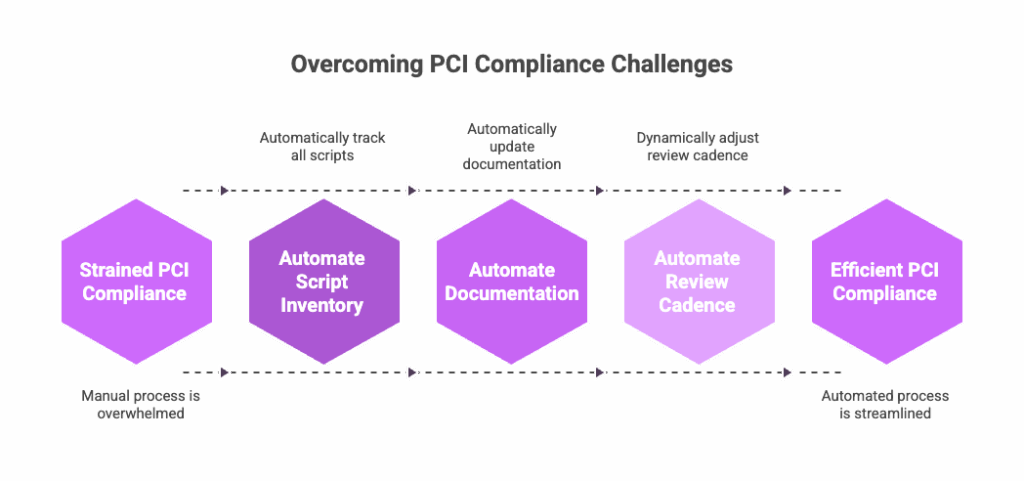
If you’re wondering whether the process has hit its limit, the symptoms usually answer it for you.
They show up in the day-to-day long before the audit does.
Signal 1: Day-to-day starts slipping
You notice the team spending more time catching up than staying current. That happens because the review cadence stays fixed while the number of moving parts increases. Script inventories begin to lag, and new pages reach production before anyone reviews them.
At that point, know that the environment is not misbehaving, but it is just outpacing a manual cycle.
Signal 2: Documentation loses its footing
The documentation then stops lining up with the browser. This is not carelessness, it is drift.
You see it when QSAs find scripts that never made it into the inventory, and third-party updates land quietly. As a result, different analysts document the same page differently because they are each capturing a slightly different moment in time.
Signal 3: When the team starts feeling the strain
If you catch your team documenting more than they are deciding, that is the signal the load has crossed a threshold.
At that point, the work shifts from analysis to upkeep, and the hours stop landing on the right problems. Burnout begins to surface, turnover erases hard-won context, and headcount requests stall because leadership senses that adding people will not rebalance the equation.
Signal 4: When compliance velocity holds back business
You can see this signal when product teams begin timing their work around compliance instead of shipping when they’re ready. The review cadence lags behind the release cadence, and the gap widens until audits turn into long rebuilds. From there, leadership starts to wonder why predictability is going down instead of up.
Scaling compliance without scaling headcount
Automation works by keeping the compliance data synchronized with how the browser behaves. It maintains that alignment continuously, which is a part of the process humans cannot sustain at scale.
And you need that once you cross twenty-five to fifty payment pages, as the change rate pushes past what one analyst can track reliably.
What automation absorbs
Automation takes over the parts of the process that grow with every new page. These are the tasks that involve tracking scripts, monitoring changes, and keeping the inventory accurate as the environment shifts continuously.
In practice, that means the system takes on responsibilities like:
- Continuous discovery across the entire payment footprint
- Automatic classification of first, third, and fourth-party scripts
- Real-time detection of new or altered scripts
- A centralized inventory that reflects what the browser actually loads
- Audit evidence is produced automatically as monitoring occurs
Once automation takes on the repetitive work, things change for the better. Script tracking drops to zero. Alert review becomes a small, steady cadence. Authorization moves from ad hoc decisions to a consistent flow. And audit evidence turns from reconstruction into simple retrieval.
It might show up like this in practice:
| Activity | Before automation | After automation |
| Script tracking | 40+ hours per week | 0 hours |
| Alert review | Not applicable | 2–4 hours per week |
| Authorization decisions | Ad hoc | 2–4 hours per week |
| Audit evidence | Days per audit | Minutes |
| Strategic work | Whatever time is left | The majority of the time |
Taming complexity with PaymentGuard AI
PaymentGuard AI brings the environment back into alignment by keeping visibility continuous instead of episodic. It removes the drift that builds between reviews, so the footprint finally settles into something the team can manage again.
Once that baseline is steady, separate noise from signals and rebuild a workflow that moves with the environment instead of behind it.
This is how the transition with PaymentGuard AI looks.
Phase 1 (Week 1–2): Stabilize
PaymentGuard AI begins by establishing full visibility. It scans every payment page continuously and maps what the browser actually loads, without requiring any immediate fixes or manual cleanup.
Within days, it reveals the full script landscape across the entire footprint, including variants no one knew existed and pages that never made it into the inventory. So you finally have a single, accurate view of the footprint before making any decisions.
Phase 2 (Weeks 3–4): Prioritize
Once the real footprint is visible, PaymentGuard AI reveals the highest-risk surfaces. For example, scripts touching payment fields, the ones that introduce new third or fourth-party behavior, or the ones that break their integrity baselines.
This way, the team concentrates on authorization decisions, and unauthorized scripts are flagged cleanly and routed for removal.
Phase 3 (Weeks 5–8): Systematize
With the highest-risk areas addressed, the rest of the environment moves into a predictable rhythm. PaymentGuard AI provides a steady workflow for authorization, alert review, and ongoing integrity checks. Escalation paths become clear because the system calls out anything that drifts.
For teams, this makes training easier because context is already in the platform. The remaining pages flow through the process without the usual detective work.
And as a result, the program starts behaving the same way every week.
Phase 4 (Month 3+): Optimize
Once the environment is stable, the work shifts from volume to value. Alert thresholds are refined, vendor oversight improves, and capacity moves back to strategic decisions instead of maintaining inventories.
PCI audit prep becomes a quick export because the evidence already exists. The program stops being rebuilt before each QSA visit and starts being maintained continuously.
FAQ
At what point does manual PCI compliance actually become unmanageable?
The breaking point typically arrives between 25 and 50 payment pages. That’s when one analyst can no longer track changes reliably within a weekly review cycle. Beyond that threshold, you’re either accepting compliance gaps or adding headcount at an unsustainable rate. The environment starts moving faster than your team can document it.
We only have 30 payment pages right now. Should we wait to automate PCI complaince?
If your footprint is stable and changes are infrequent, manual processes can hold. But if you’re launching new products, running A/B tests, or planning acquisitions, the page count will accelerate faster than you expect. Most teams find it easier to implement automation before the crisis hits rather than during an audit crunch when everything is already breaking.
Why doesn’t hiring more analysts solve the PCI scaling problem?
Because analyst capacity doesn’t scale linearly. One analyst can effectively manage 25-30 pages. Beyond that, you’re not just adding people, you’re adding coordination overhead, documentation drift, and version conflicts. At 200 pages, you’d need 7-8 full-time analysts costing $600K+ annually, and they’d still be playing catch-up because the environment changes continuously while teams can only review weekly.
What happens to our team when we automate PCI compliance? Are we reducing headcount?
No. Automation shifts your team from tracking scripts to making authorization decisions and managing risk. The repetitive work disappears, but the strategic work expands. Your analysts stop spending 40+ hours per week maintaining spreadsheets and start focusing on vendor oversight, policy decisions, and audit strategy. The team becomes more effective, not smaller.
How long does it take to get PaymentGuard AI up and running?
Most organizations reach full visibility within the first two weeks. PaymentGuard AI scans your entire payment footprint immediately and reveals what’s actually running in the browser. No manual setup required. By week four, high-risk scripts are identified and prioritized. By month three, the environment settles into a predictable rhythm with continuous monitoring and automated evidence collection.
What if our payment pages are spread across different platforms, regions, or business units?
That’s exactly the scenario where manual processes collapse first. PaymentGuard AI monitors everything that touches payment data, regardless of where it lives—different tag managers, regional variants, A/B experiments, or legacy acquisitions. It creates a single, unified view of your entire footprint so you’re no longer tracking fragments across spreadsheets and teams.
How does automated PCI monitoring handle scripts that change constantly?
PaymentGuard AI monitors your payment pages continuously, not weekly. When a script changes, whether it’s a vendor update, a tag manager push, or an A/B test variant—the system detects it in real time and flags it for review. You see what changed, when, and whether it’s authorized. The inventory stays synchronized with the browser automatically, so you’re never working from outdated documentation.
The bottom line
Compliance only scales when your process allows it to. PaymentGuard AI maintains the visibility, evidence, and integrity that your team cannot sustain manually.
So if the workload has started to outgrow the team, it’s a good moment to see what automation looks like in practice. Schedule a demo to see how PaymentGuard AI scales PCI compliance from 5 to 500+ payment pages without scaling your team.


