Learn how to make your website HIPAA compliant in 2025 with 30+ checklist items, from BAAs and access controls to run-time monitoring and audit-ready evidence.
What you’ll learn in this article
- Compliance extends well beyond Secure Sockets Layer (SSL) and hosting; it’s about controls, monitoring, and proof
- Browser-based security is the most overlooked gap on modern sites
- Vigilance is ongoing: assess, harden, monitor, and review on a cadence
- Clean documentation (inventories, approvals, alerts, logs) demonstrates due diligence
Evidence-Ready HIPAA Websites Start At Run-Time
In September 2025, the Office for Civil Rights (OCR) announced a Health Insurance Portability and Accountability Act (HIPAA) settlement with Cadia Healthcare.
The investigation focused on access and authorization controls. This case is another reminder: web-facing gaps remain an active enforcement target.
At the same time, independent telemetry shows modern sites rely heavily on third parties in the browser.
HTTP Archive’s Web Almanac documents the ubiquity of third-party services and tracking across the open web, which expands the attack and compliance surface beyond your servers.
Most HIPAA website checklists stop at SSL and hosting, but that’s not where today’s risk ends.
If your site loads marketing tags, analytics, schedulers, captchas, chat, or a Content Delivery Network (CDN), browser-based code executes in patients’ browsers. Often, it comes from many external domains. Traditional tooling doesn’t see it.
Our checklist focuses on what teams miss and offers a practical, evidence-ready path to HIPAA compliant websites that includes browser-based security controls most guides overlook.
The four HIPAA rules
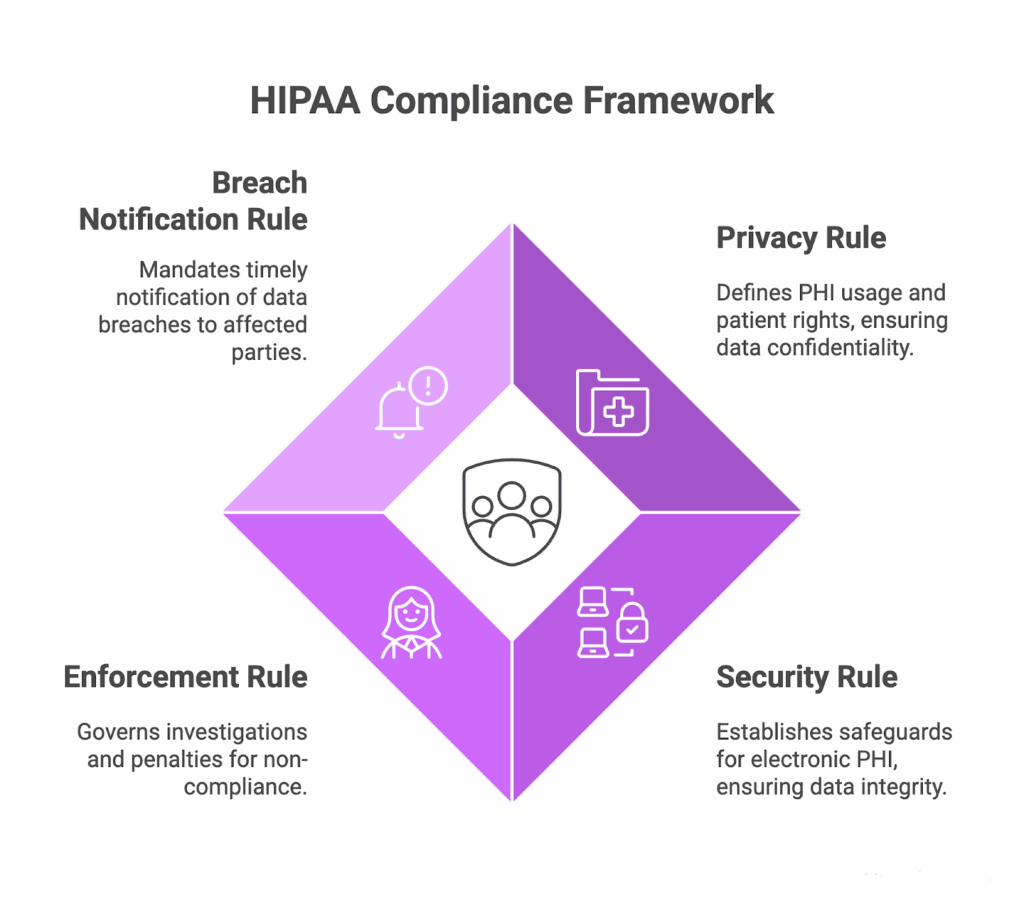
HIPAA organizes obligations into four rules that govern how covered entities and business associates handle Protected Health Information (PHI).
Privacy Rule
The Privacy Rule defines when PHI may be used or disclosed. It requires a Notice of Privacy Practices and establishes patient rights. It mandates the “minimum necessary” standard. Finally, it sets conditions for authorizations and permitted disclosures for treatment, payment, and healthcare operations.
Security rule
The Security Rule covers electronic PHI (ePHI) and requires administrative, physical, and technical safeguards. For websites, this means robust authentication and authorization, session controls, encryption, monitoring, minimal admin rights, and vetting third-party code.
Enforcement rule
The Enforcement Rule sets the OCR’s investigation and penalty process. This includes civil money penalty tiers, resolution agreements, and corrective action plans. It governs how OCR enforces compliance across the Privacy, Security, and Breach Notification Rules. It also addresses how incidents and noncompliance are adjudicated.
Breach notification rule
This rule requires prompt notification after a breach, no later than 60 days, to affected parties, HHS, and sometimes the media. Business associates must alert covered entities, and every incident needs a risk assessment.
HIPAA website checklist for 2025
Most HIPAA website checklists stop after covering basic requirements. The browser, however, is now your most prominent blind spot. Our checklist addresses this by including browser-based security, which many guides overlook.
Disclaimer: This guide is for educational purposes and operational readiness. It does not constitute legal advice and does not replace your organization’s HIPAA compliance program or counsel. Always follow your legal department’s guidance and the most current HHS/OCR rules and bulletins.
Administrative safeguards checklist
| Checklist item | Yes/No |
| Risk Assessment Annual website security risk assessment completed and recorded | |
| All third-party scripts and vendors (analytics, chat, tag manager, Content Delivery Network (CDN), form handlers) are cataloged | |
| Risk management plan documented with owners, timelines, and residual risk | |
| Business Associate Agreements (BAAs) BAA executed with the hosting provider | |
| BAA executed with an analytics platform, or analytics fully blocked from any ePHI flows | |
| BAA executed with a chatbot/live-chat provider | |
| BAA executed with form handler/CRM (Customer Relationship Management) /marketing platform handling submissions | |
| Vendors refusing BAAs are documented with compensating controls or removed from the ePHI scope | |
| Google Analytics note: If Analytics can receive identifiers tied to health interactions, it functions as a Business Associate. Google does not sign BAAs for Google Analytics. Therefore, either prevent any ePHI from ever reaching GA or remove GA from covered journeys and use an analytics provider that signs a BAA. | |
| Access Management Role-based access controls (least privilege) enforced for Content Management System (CMS)/CDN/tag manager | |
| HIPAA training completed for all staff with website/admin access | |
| Admin/audit logs enabled and retained for CMS, CDN, tag manager, SSO/IdP | |
| Policies & Procedures Website security policies documented (tracking, cookies, browser-based code, data flows) | |
| Incident response plan includes run-time/script-compromise scenarios and notification steps | |
| Vendor vetting procedure defined (security questionnaire, BAA review, change control expectations) |
Technical safeguards checklist
| Checklist item | Yes/No |
| Access Controls Unique user IDs and Multifactor authentication are enforced for all admin and PHI-access accounts | |
| Auto-logoff configured after 15-30 minutes of inactivity | |
| Role-based access with least privilege for CMS, database, tag manager, and SSO/IdP | |
| Password policy aligns with NIST SP 800-63B | |
| Encryption & Data Protection TLS (Transport Layer Security) 1.2+ enforced site-wide with HTTP→HTTPS redirects | |
| HSTS headers configured | |
| Database encryption at rest enabled for all ePHI tables/volumes | |
| Backups containing ePHI are encrypted with managed keys | |
| Form Protection All PHI forms use POST; no PHI is ever placed in URLs/query strings | |
| Autocomplete is disabled on PHI fields to prevent local browser storage and unintended autofill | |
| PHI responses are excluded from cache | |
| Audit & Monitoring Access logs enabled for all PHI access attempts | |
| Failed-login monitoring and alerting are configured | |
| Security/audit logs retained for 6 years | |
| File Integrity Monitoring (FIM) enabled for web/app binaries, configuration, and script assets |
Browser-based security controls
| Checklist item | Yes/No |
| Third-Party Script Management A complete, current inventory exists for every script/tag loaded on patient-facing pages. | |
| BAA status is documented for each vendor/script domain (analytics, chat, tag managers) | |
| A formal approval workflow gates any new script before production | |
| Script behavior is audited on a schedule | |
| Continuous monitoring alerts on unauthorized script changes, additions, or domain shifts. | |
| Analytics & Session Tools IP anonymization is enabled, and PHI form fields are excluded from analytics collection | |
| Any session replay tool must automatically mask or redact all PHI by default | |
| Privacy-preserving analytics alternatives are evaluated and documented when PHI risk exists | |
| Script Security A whitelist-based CSP (Content Security Policy) is enforced for script-src, connect-src, frame-src, and frame-ancestors | |
| Subresource Integrity (SRI) hashes are applied to static third-party JavaScript where feasible | |
Vulnerability Management External vulnerability scans run at least quarterly for web assets in scope. | |
| Annual penetration testing covers the website, portals, and browser-based attack paths | |
| Security patches for web stacks and libraries are applied within 30 days | |
| CMS, plugins, and tag manager templates are kept current; unsupported components are removed or isolated |
Ongoing compliance
| Checklist item | Yes/No |
| Business Continuity Daily encrypted backups are performed, and verification logs retained | |
| Quarterly restoration tests are executed in a clean environment and documented | |
| Annual disaster recovery test is completed with Recovery Time Objective (RTO)/Recovery Point Objective (RPO) results recorded | |
| Breach Preparedness Breach detection tools are active with alert triage procedures | |
| Incident response runbook defines roles, evidence handling, and regulator timelines | |
| Pre-approved patient/provider notification templates are maintained and current | |
| Regular Reviews Quarterly HIPAA self-assessments are completed with tracked remediations | |
| Annual risk assessment updates assets, threats, and vendor inventories | |
| Formal vendor reviews capture BAA status, change logs, and incident history | |
| Control prevents marketing from adding tags/tools without a security review or BAA | |
| Control prevents website redesigns from going live without re-assessment | |
| Control prevents orphaned CMS/Secure File Transfer Protocol (SFTP)/accounts from remaining active after turnover | |
| Control prevents session replay from recording PHI due to misconfiguration | |
| Control prevents third-party script/CDN changes from deploying without integrity checks/CSP |
The Failure Patterns OCR Sees Most Often
When OCR digs into website incidents, three operational patterns repeat. First, marketing or UX teams add a tag such as an ad pixel, analytics snippet, or session-replay plug-in without a security review or a Business Associate Agreement.
The tool begins capturing form fields or page context tied to care interactions, and PHI flows to a third party outside your controls. The fix is governance, where you need to gate all new scripts behind a lightweight approval step, document data access, and require BAAs (or block the tool from any PHI path).
Second, redesigns and launches ship with “temporary” settings that never got cleaned up. Treat the go-live as a change to regulated systems and ensure pre-launch checks for CSP, PHI-in-URL tests, replay/analytics exclusions on PHI pages, and a post-deploy verification that matches what’s in production.
Third, access lingers. Orphaned admin accounts after turnover and shared credentials keep the door open to exports, backups, and submission inboxes. Close the loop with identity hygiene: use SSO/IdP as the source of truth, implement role-based access with least privilege, automate off-boarding, and conduct periodic attestations.
In every case, these are routine process gaps. Continuous run-time monitoring, script inventory, and disciplined change control will help you to remediate exceptions quickly.
How Feroot helps you prove HIPAA website compliance
Your HIPAA-compliant website should demonstrate control over who accesses ePHI, how data is transferred, and what code runs in the patient’s browser. The challenge is not policy; it’s maintaining visibility into dynamic browser-side risks.
Most gaps appear at run-time, where third-party scripts change and no server log records them. The programs that avoid surprises treat the browser as part of the regulated surface and keep evidence to back that up.
Feroot adds the missing layer for your website by continuously inventorying patient-page scripts, monitoring run-time behavior for policy violations, and providing audit-ready evidence. It turns “we think” into “here’s what ran, when, and why.”
As a next step, use the complete checklist to baseline your site this week, and request a free browser-based security audit to validate browser-side risks and close any gaps.