It starts with a simple audit. Your legal team checks Business Associate Agreements after OCR’s tracking technology guidance. Google Workspace BAA: signed. Analytics platform BAA: signed. CRM and marketing tools: covered.
Then the question that changes everything: Do we have BAAs for the tracking pixels on our patient pages?
What you will learn in this article
- Why Google, Facebook, LinkedIn, and analytics vendors refuse to sign BAAs for tracking pixels (business model and technical constraints explained)
- Manual implementation approach: Blocking pixels on PHI pages, URL sanitization, data minimization settings, and continuous monitoring requirements
- Automated approach with HealthData Shield AI: Real-time PHI detection, automatic sanitization, and audit-ready evidence generation
- How to respond to auditors when vendor BAAs are unavailable, with technical safeguards that satisfy HIPAA requirements and 60-day implementation roadmap
Why won’t vendors sign BAAs for tracking pixels?
You investigate and the gaps become clear. Google Analytics BAAs cover enterprise environments but not the tracking pixel in patients’ browsers. Analytics vendor BAAs protect their platforms but not the JavaScript executing on your site. Facebook and LinkedIn don’t offer BAAs for advertising pixels at all.
You reach out anyway, because your legal team insists on confirming. Google declines. Facebook declines. LinkedIn declines. Your analytics vendor politely explains that they cannot sign a BAA for browser based tracking because they do not control what the browser collects or what your site exposes. You end up with a clear and uncomfortable truth. The tracking pixels you rely on for patient acquisition and conversion measurement do not have BAA coverage, the vendors will not provide it, and the HIPAA liability for any PHI those pixels capture remains entirely yours.
Check out “PHI or Not?” 12 HIPAA Edge Cases (With GTM/Adobe/Tealium Fixes)
This experience has become common across the healthcare sector, and regulators have noticed. The federal government has stated that online tracking tools may violate HIPAA when they collect individually identifiable health information without proper safeguards.
Recent federal actions have named Meta Pixel and Google Analytics specifically as tools that can transmit sensitive data from patient websites. The enforcement pattern is consistent. Regulators focus on whether covered entities put technical safeguards in place, not on whether vendors signed BAAs for their advertising and analytics pixels.
This shift is clarifying. If vendors will not sign BAAs for tracking pixels, then HIPAA compliance cannot depend on a contract that does not exist.
The solution is not contractual. It is technical. The organizations that succeed are the ones that treat tracking pixels as data flows that must be controlled, monitored, and documented, with or without vendor cooperation.
This is frustrating, and that frustration is legitimate. You requested BAAs. Vendors declined. You still have the regulatory burden.
The good news is that healthcare organizations can solve this problem through technical safeguards that prevent PHI from reaching tracking pixels in the first place. The vendors may not change their position, but you can take full control of your own compliance posture.
Why vendors will not sign BAAs for tracking pixels
Many healthcare teams are surprised when major vendors refuse to sign Business Associate Agreements for tracking pixels. A BAA feels like the obvious path forward. You are a covered entity. The vendor receives data. HIPAA would seem to require that the vendor operate under BAA terms. Once you look closely at how pixels actually work, the vendor decisions make more sense.
A BAA covers data that a vendor processes on your behalf inside systems they control. When a vendor receives PHI within a closed environment, they can apply access restrictions, auditing, storage controls, and retention policies that align with HIPAA. They can state with confidence that the data will only be used for the purpose you authorized.
Tracking pixels do not behave that way. A pixel’s JavaScript code executes in the client’s browser. It reads the page. It examines the URL. It may detect form fields. It collects information based on how your site behaves and how your developers configured it. The vendor does not control any of this. From their point of view, they are not extracting data from your systems. They are receiving whatever the browser sends them.
This difference matters. If a vendor signs a BAA for a tracking pixel, they become responsible for data they did not design, did not configure, and cannot limit without fundamentally changing their product.
Why Google avoids BAAs for free tracking pixels
Google provides BAAs for Google Cloud Platform, Google Workspace, and Google Analytics 360 when deployed in specific enterprise environments. In those environments, Google controls the infrastructure and can apply strict data boundaries.
The free Google Analytics pixel is different. It feeds into a broad ecosystem of advertising and measurement tools. That ecosystem depends on cross site aggregation and machine learning that draws patterns from millions of sites. To operate under a HIPAA BAA for tracking pixels, Google would need to isolate healthcare traffic, restrict downstream use, and prevent that data from informing analytics models across the network. That would change the fundamental design of their advertising business.
Instead, they draw a clear line. Enterprise products get BAAs. Free tracking pixels do not.
Why Facebook and LinkedIn decline BAAs entirely
Meta Pixel and LinkedIn Insight Tag exist to support advertising. They rely on data from many sites to improve targeting, build audiences, and refine performance. A BAA would require them to wall off healthcare traffic, prevent sharing with their targeting systems, and redesign their internal data flows. None of that is compatible with their current business models.
These vendors are not withholding BAAs out of disregard for healthcare. They are making a business decision that their advertising products cannot operate under HIPAA restrictions.
Why some analytics vendors only sign partial BAAs
Even analytics providers that support HIPAA typically limit their BAAs to the data stored inside their platform. They rarely extend BAA protection to the run-time script that runs on your site. They will protect data once it reaches their systems, but they cannot accept liability for:
- How your developers implemented the pixel
- What content appears on your pages
- Which other scripts are present
- What URL patterns expose
- Which parameters your tag manager sends
They cannot control any of those things. If they signed a BAA for the browser based component, they would accept liability for risks that belong to the covered entity.
The practical takeaway
The vendors are not avoiding responsibility. They are acknowledging the technical and business constraints that make a tracking pixel BAA for HIPAA impossible for them to offer. The result is simple. If you want to continue using tracking pixels, you need to implement technical controls that prevent PHI from reaching them. That is the only path that does not depend on vendor cooperation.
The two approaches to HIPAA compliant tracking without BAA coverage
Once you recognize that the vendor BAA will not arrive, the compliance path becomes clearer. Your goal is to ensure that tracking pixels only receive data that does not qualify as PHI. If a pixel never receives PHI, you are not disclosing PHI to a vendor that lacks a BAA. This approach aligns with how regulators have structured recent enforcement actions. The focus is on what data leaves your site.
There are two main ways organizations achieve this.
Manual technical controls
Your IT and compliance teams create rules inside your tag manager, web templates, and analytics configurations that limit what pixels can see. You block pixels on sensitive pages. You sanitize URLs before pixels read them. You reduce pixel features and disable automatic data collection. You run scheduled audits to verify that nothing has drifted.
This model uses the staff you already have. It can be effective, but it requires steady discipline and a reliable audit practice.
Feroot HealthData Shield AI: Automated monitoring and control
Automated monitoring and control gives organizations a way to manage tracking pixel risk even when vendor BAAs are unavailable. Solutions like Feroot HealthData Shield AI continuously monitor tracking pixels, detect PHI transmission attempts, and automatically block PHI before it reaches third party pixels. The work shifts from manual rules and frequent audits to real time visibility and protection in the browser.
This model reduces the ongoing staff time required to maintain compliance. Instead of revisiting blocking logic every time the site changes or marketing adds a new tag, the monitoring layer identifies new pixels the moment they load and applies safeguards without waiting for a scheduled review. The system observes the actual data flowing through each pixel and intervenes before transmissions occur, which removes the guesswork that often accompanies manual configuration.
Automated monitoring does introduce a new vendor relationship, but the BAA available from Feroot covers this monitoring layer in the way that tracking pixel vendors will not. It creates a defined boundary where the technical controls are both enforceable and documented. The outcome is the same goal your team has been working toward. Pixels receive the conversion and analytics data your marketing team depends on, while PHI never leaves your environment, even when the pixel vendor declines a BAA.
Table 1. Manual controls vs automated monitoring
| Factor | Manual controls | Feroot HealthData Shield AI |
| BAA required | No | Yes, Feroot signs BAA |
| Setup time | 2 to 4 weeks per site | Around 48 hours |
| Maintenance | Ongoing staff time | Minimal |
| New pixel detection | Manual audits | Immediate automatic detection |
| Staff expertise | Technical and HIPAA understanding | Minimal after deployment |
| Cost | Internal labor | Subscription based |
Manual approach: Implementing technical controls without vendor BAAs
For organizations with strong internal teams, the manual approach can work well. It gives you full control and does not rely on external vendors. The key is recognizing that manual controls are not a one time configuration. They are a living set of safeguards that must adapt whenever your site, your marketing campaigns, or your tracking tools change.
Step 1: Implement pixel blocking on PHI pages
Begin with the pages that consistently contain PHI. These pages include patient portals, appointment detail views, prescription refill workflows, test result pages, billing statements, and telehealth consultation screens. No matter how your site is designed, these areas always contain sensitive information in the body of the page, the DOM, or the URL.
Inside your tag management system, create rules that stop all marketing and advertising pixels from loading on these pages. Your goal is to ensure that nothing with cross site tracking behavior has the opportunity to interact with PHI rich content. If you retain any analytics at all on these pages, it should be limited to internal first party tools that you fully control and that operate within your existing HIPAA safeguards.
The important detail is sequencing. Your blocking logic must run before any pixel code executes. Post load suppression does not prevent initial data collection. After deployment, test the rules thoroughly. Whenever the site structure changes, validate that the blockers still operate as intended. Document which pages have blocking and why. That documentation becomes valuable when legal counsel or auditors ask for evidence of your decisions.
Step 2: Sanitize URLs before pixels can read them
Next, address the data that pixels often capture indirectly. Many healthcare sites reveal PHI through URL patterns or path segments. A page with the path /appointments/cardiology or /services/diabetes-management might seem harmless, but when combined with an IP address or cookie, those patterns can reveal sensitive health interests.
Your task is to provide sanitized versions of URLs to tracking pixels. There are several practical ways to achieve this. You can generate a sanitized path server side and expose it in a data layer variable that your tag manager reads instead of the native URL. You can use your tag manager to normalize path segments into generic categories. You can provide JavaScript that rewrites the URL in memory before any pixel code runs, while leaving the visible URL unchanged for users and SEO.
The goal is consistency. All service specific pages should resolve to the same neutral category when pixels evaluate them. A cardiology appointment and an orthopedics appointment may have different clinical meanings, but from a tracking perspective both can be presented as a generic appointment confirmation. This reduces granularity in your analytics but removes the risk of PHI exposure through URL patterns.
Step 3: Configure strict data minimization for each pixel
Once blocking and sanitization are in place, refine the pixels that remain active on your non PHI pages. Review the configuration options for each pixel and disable features that collect data that could be considered identifying or health related.
For Google Analytics, consider turning off automatic enhanced measurement, avoiding user ID stitching, and removing any custom dimensions that might contain identifiers. Enable IP anonymization and avoid Google Signals for properties that receive traffic related to health services. These settings help constrain what Analytics can observe.
For Meta Pixel, disable Automatic Advanced Matching so the pixel does not attempt to hash email addresses or phone numbers from form fields. Rely on explicit event definitions rather than broad page view events that fire everywhere. Avoid deploying the pixel on any page with even indirect health context.
For LinkedIn, keep the Insight Tag limited to top level marketing content such as your homepage, corporate pages, or general informational materials. Avoid using it for service line pages or content that describes diagnoses or treatments. Conversion tracking should be reserved for general marketing goals rather than patient intake journeys.
Step 4: Establish continuous monitoring
Manual controls remain effective only if you continue monitoring them. Healthcare sites evolve constantly. New content launches. Marketing runs new campaigns. Tag managers change. Internal teams shift responsibilities. Without a monitoring schedule, rules drift and gaps open quietly.
Create a cadence that includes weekly checks for new pixel additions, verification that blocking rules are still active, and reviews of URL structures on newly launched pages. On a monthly basis, perform a more comprehensive site scan to ensure no unauthorized pixels or scripts have been added. On a quarterly basis, update documentation, retrain teams that deploy pixels, and verify that any data minimization settings still align with your policy.
This kind of routine prevents unpleasant surprises. When an auditor asks whether a pixel has ever loaded on a patient portal page, you will be able to show a consistent history of checks.
Step 5: Document everything for compliance
Documentation is essential. Write down the logic behind every blocking rule. Provide before and after examples of your URL sanitization approach. Capture screenshots of pixel configurations that show data minimization settings. Maintain logs of your weekly and monthly checks. Preserve evidence of any unauthorized pixels you discovered and removed. Note every instance where you requested a vendor BAA and received a refusal.
This documentation demonstrates to auditors and legal teams that you have implemented working technical safeguards. Even when vendors decline BAAs, you can show that PHI is not being transmitted.
Feroot HealthData Shield AI: Automated approach when vendor BAAs are not available
Organizations that need a more scalable, dependable, and less labor intensive approach often choose automated monitoring. This allows your technical safeguards to operate continuously across your digital footprint without requiring constant manual intervention.
What Feroot HealthData Shield AI solves
When tracking pixel vendors will not sign BAAs, HealthData Shield AI becomes the technical layer that prevents PHI from reaching those pixels. It identifies every pixel across your healthcare websites, evaluates what data each pixel is trying to access, and applies real time controls that keep PHI contained. This approach does not depend on vendor cooperation. It works alongside your existing tag manager and pixel implementations.
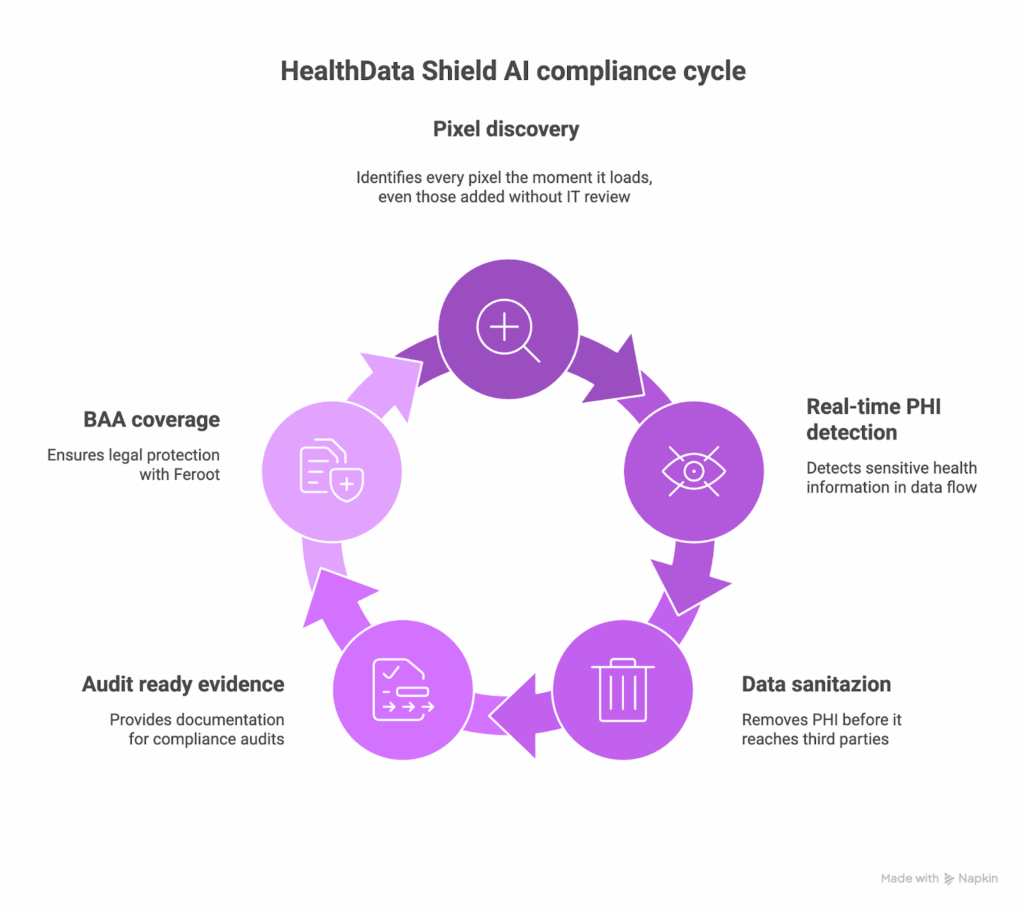
Here is what HealthData Shield AI contributes to your compliance posture:
- Automatic pixel discovery that identifies every pixel the moment it loads, even those added without IT review
- Real time PHI detection based on the data that actually flows through your pages
- Automatic sanitization that removes PHI before it reaches third party pixels, while preserving clean analytics events
- Audit ready evidence showing controls in place and transmissions blocked
- A BAA with Feroot that covers the monitoring layer vendors will not support
Its automatic PHI sanitization protects both compliance and marketing operations. For example, a patient visiting an appointment page at a path that reveals a specialty will generate a sanitized event such as /appointments/confirmed. Your analytics still receives conversion data, while the PHI never leaves the page.
How it works without vendor BAAs
Feroot HealthData Shield AI does not require tracking pixel vendors to sign BAAs. It operates as a protective layer in the browser that intercepts data before it reaches those vendors. It evaluates each transmission for PHI patterns. It sanitizes transmissions or blocks them entirely if needed. It allows non sensitive tracking data to proceed so that your marketing teams still get the insights they need.
From the vendor’s perspective, they receive standard event data. From your compliance team’s perspective, no PHI is disclosed to a third party that lacks a BAA. And because Feroot signs a BAA with your organization, you have contractual coverage for the monitoring layer itself.
Implementation details
Deployment typically requires placing a single script across your patient facing sites. The system begins learning your site structure within hours. It identifies PHI patterns specific to your clinic types, appointment flows, and content structures. It then applies safeguards automatically. As new marketing campaigns launch or new pages are added, the system adapts without requiring manual rule updates.
When automated monitoring makes sense
Automated monitoring is well suited to organizations with multiple websites, frequent marketing activity, or limited internal resources for constant auditing. It is also valuable for organizations preparing for compliance reviews or responding to prior warnings. When vendor BAA negotiations have gone nowhere, automated monitoring creates a reliable path forward that does not depend on vendor changes.
Table 2. Evidence requirements: Manual vs automated
| Evidence type | Manual approach | Feroot HealthData Shield AI |
| Proof that pixels do not capture PHI | Manual logs and test results | Automated real time logs |
| Detection of unauthorized pixels | Weekly or monthly scans | Immediate detection |
| Documentation of controls | Manually produced | Auto generated reports |
| Verification after site updates | Manual testing | Continuous verification |
| BAA coverage for monitoring | Not applicable | Covered by Feroot |
Building your implementation plan when vendor BAAs are not available
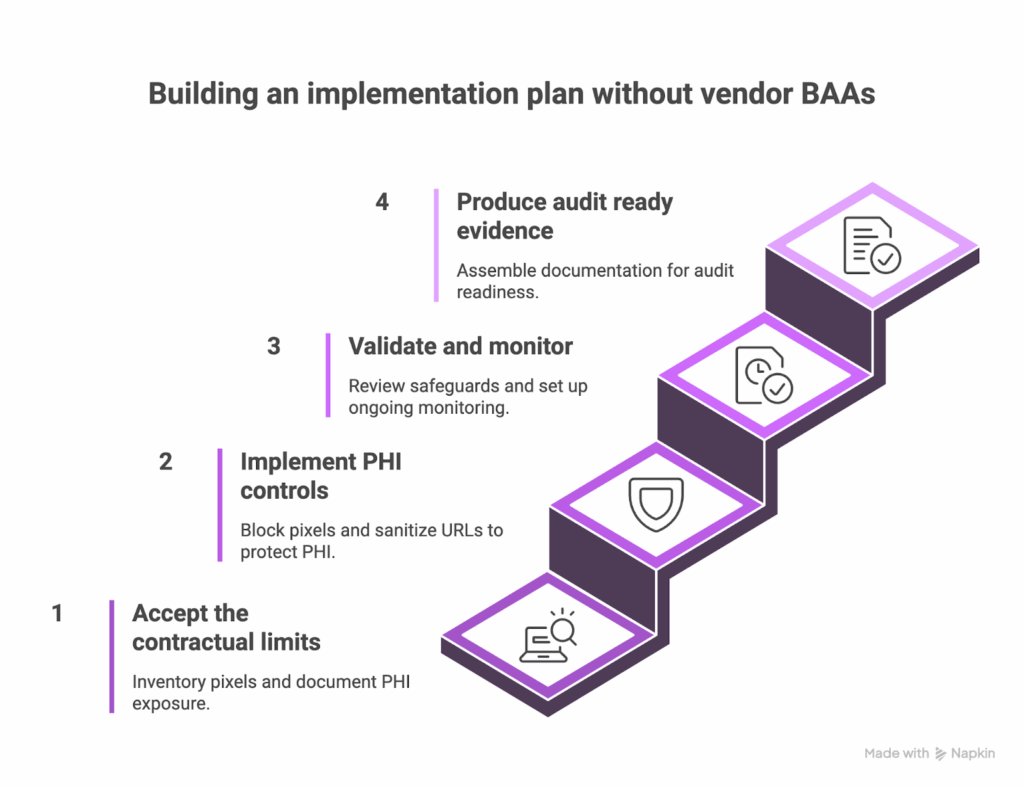
A clear plan helps teams move from contractual frustration to technical execution. This 60 day roadmap balances practical safeguards with the documentation auditors expect. It creates alignment across legal, compliance, IT, and marketing while giving you a defensible narrative for why PHI never reaches third party pixels.
- Days 1 to 15: Accept the contractual limits and establish your baseline. Begin by acknowledging that vendor BAAs for tracking pixels are not available. Inventory every tracking pixel across patient facing sites, including pixels deployed through tag managers and those embedded directly in templates. Document what PHI appears on key pages and how URLs, forms, and content expose sensitive data. This becomes your baseline for improvement.
- Days 16 to 30: Implement PHI controls. Block pixels entirely on pages that consistently contain PHI. Apply URL sanitization for any path segments that reveal clinical details. Configure each pixel to minimize automatic collection. Test each safeguard to ensure marketing still receives essential conversion data. Document every setting and rationale.
- Days 31 to 45: Validate and monitor. Review your safeguards with the same rigor used in your baseline. Confirm that PHI is no longer reaching pixels that lack BAA coverage. Establish a monitoring schedule. Manual programs rely on weekly checks and monthly audits. HealthData Shield AI shifts this to continuous, real time monitoring. Train marketing teams on new processes for adding pixels. Enable alerts for unauthorized tracking.
- Days 46 to 60: Produce audit ready evidence. Assemble the documentation that demonstrates your controls in action. Include your pixel inventory, PHI control measures, monitoring history, and your record of BAA requests that vendors declined. Prepare the narrative that explains how your technical safeguards achieve compliance even without vendor BAAs.
The answer to that audit question
Auditors appreciate clarity more than complexity. You can respond directly.
We requested BAAs from Google, Facebook, and LinkedIn to cover tracking pixel implementations. All three declined due to business model conflicts with HIPAA restrictions. Rather than continue seeking BAAs that were unavailable, we implemented technical safeguards that prevent PHI from reaching tracking pixels. Our monitoring system ensures that pixels receive analytics data without accessing protected health information. This approach aligns with regulatory expectations that emphasize working technical controls. We also have a BAA with Feroot covering the monitoring solution itself.
This statement shows due diligence, technical competency, and a clear understanding of the regulatory environment.
FAQ
If vendors will not sign BAAs for tracking pixels, are we automatically exposed to HIPAA violations?
Many teams ask whether the absence of a vendor BAA creates immediate liability. It does not. HIPAA requires safeguards, and those safeguards can be technical rather than contractual. If PHI never reaches a tracking pixel, you are not disclosing PHI to a vendor. Regulators consistently focus on the data that leaves your environment, not on whether a vendor offered a BAA.
Should we continue requesting BAAs from vendors like Google and Facebook?
Organizations often wonder whether they should keep asking the major platforms to sign BAAs for their pixels. You can continue requesting them since it demonstrates diligence, but these vendors have been consistent in declining. Their advertising and analytics products are not designed to operate under HIPAA restrictions. Your compliance path should move forward based on technical safeguards you can apply today.
Would removing all tracking pixels solve the problem?
Some organizations consider eliminating every pixel to avoid any possibility of PHI exposure. That approach is possible, but most healthcare organizations rely on analytics to measure patient acquisition and digital experiences. The more sustainable strategy is keeping pixels in place with guardrails that prevent PHI from being exposed.
Many teams ask whether the absence of a vendor BAA creates immediate liability. It does not. HIPAA requires safeguards, and those safeguards can be technical rather than contractual. If PHI never reaches a tracking pixel, you are not disclosing PHI to a vendor. Regulators consistently focus on the data that leaves your environment, not on whether a vendor offered a BAA.
Should we continue requesting BAAs from vendors like Google and Facebook?
Organizations often wonder whether they should keep asking the major platforms to sign BAAs for their pixels. You can continue requesting them since it demonstrates diligence, but these vendors have been consistent in declining. Their advertising and analytics products are not designed to operate under HIPAA restrictions. Your compliance path should move forward based on technical safeguards you can apply today.
Would removing all tracking pixels solve the problem?
Some organizations consider eliminating every pixel to avoid any possibility of PHI exposure. That approach is possible, but most healthcare organizations rely on analytics to measure patient acquisition and digital experiences. The more sustainable strategy is keeping pixels in place with guardrails that prevent PHI from being exposed.
Conclusion
The realization that vendors will not sign BAAs for tracking pixels can feel discouraging at first. Once you step beyond that expectation, the path forward becomes much clearer. Tracking pixel compliance is a technical problem that requires technical controls, not a contractual gap waiting for a signature.
Whether you choose the manual approach or deploy HealthData Shield AI, both paths lead to the same place. Marketing receives useful analytics signals, PHI stays inside your environment, and your compliance team gains clear evidence that safeguards are working. You do not need vendor BAAs if vendors never see PHI.