
What you will learn in this article
- Which pages must meet PCI DSS 6.4.3 and 11.6.1, and when PSP assurances can substitute for merchant controls.
- What QSAs expect as proof, including script inventories, approvals, integrity validation, and live detection logs.
- How prevention and detection work together, from authorizing scripts and applying CSP/SRI to monitoring headers and triggering alerts.
- Which artifacts to prepare for assessment, how alerts should flow through response, and how to demonstrate continuous operation.
Back in 2022, PCI DSS v4.0 set the stage for a new era of payment security. For the first time, it asked organizations to look beyond their servers and into the browser itself.
Then, on April 1, 2025, the “future-dated” requirements, 6.4.3 and 11.6.1, moved from guidance to mandate, decisively shifting attention to mitigating client-side risk.
In plain English, the spotlight is now on what’s happening in the browser. Specifically, on the scripts that run there every time someone makes a payment.
QSAs now expect proof that you know which scripts are running, that they’re approved, and that you can spot if something changes without warning. This means logs, alerts, approvals, and records that all line up as evidence.
Once you understand what QSAs really want to see, getting ready for the assessment becomes a whole lot easier. And that’s exactly what this piece will help you do.
To whom do PCI-DSS 6.4.3 and 11.6.1 apply?
Since there’s still a gray area for CISOs and security leaders about who owns these requirements, let’s clear it up.
- In April 2023, PCI DSS v4.0.1 expanded 6.4.3 and 11.6.1 beyond the payment page to include the parent page, i.e., the merchant’s page that hosts a payment provider’s iframe.
- By January 2024, the revised SAQ A removed both requirements and replaced them with one short statement: merchants must confirm their site is “not susceptible to attacks from scripts.”
The idea was to simplify compliance, but it left many unsure how to prove it.
In February 2024, the PCI Security Standards Council issued FAQ 1588 to settle the question. It defined two clear paths forward:
- Implement the controls yourself: Apply 6.4.3 and 11.6.1 directly to your payment or parent pages.
- Or rely on your provider’s assurance: Get written confirmation from your PCI DSS–compliant payment service provider (PSP) that their hosted form includes equivalent protections.
This flowchart explains what path you need to take and when.

That’s where things stand today. If the scripts run on your page, the controls are yours. If they run entirely inside your PSP’s form, you can rely on their protection so long as it’s documented and verifiable.
Understanding requirements 6.4.3 and 11.6.1
E-skimming and other client-side attacks are now among the most common risks in online payments. These attacks target the browser, where customers enter their payment data.
To address this, PCI DSS requirements 6.4.3 and 11.6.1 mandate protection for browser-based payment pages. While requirement 6.4.3 focuses on prevention by mandating that every script on a payment page is authorized, verified, and documented, requirement 11.6.1 focuses on detection. It requires continuous monitoring and alerts for unauthorized changes to scripts or security-impacting HTTP headers.
During assessments, Qualified Security Assessors (QSAs) look for controls that ensure these requirements are met effectively.
Here’s a deeper look into requirements 6.4.3. and 11.6.1
1. Deciphering requirement 6.4.3
What it requires
PCI DSS requirement 6.4.3 simply mandates all scripts loaded or executed on payment pages to be authorized, verified for integrity, and documented with a clear business or technical justification.
Intent
It aims to prevent unauthorized or malicious code from executing in the customer’s browser, particularly e-skimming or formjacking attacks that steal data before it reaches secure servers.
Key controls that QSAs look for
On paper, 6.4.3 looks simple — authorize scripts, validate them, document the rest.
But when a QSA reviews your environment, they look past policy to see the process in motion.
Here are the controls they evaluate:
- Authorization: Every script must be reviewed and approved before or immediately after deployment.
- Integrity validation: You must verify that scripts haven’t been changed or tampered with. PCI DSS mentions options like Content Security Policy (CSP) and Subresource Integrity (SRI), but allows other detection or monitoring tools that achieve the same outcome.
- Script inventory: Maintain an accurate, up-to-date list of all scripts running on payment pages. Each entry should include its source, version, owner, approval date, and integrity verification details.
- Script justification: Document the business or technical reason each script exists. Justifications may include analytics, fraud detection, marketing, or payment processing functions.
Assessment focus
When QSAs review this control, they look for clear evidence that you know:
- Which scripts belong on your payment pages
- Who approved them and when
- How do you confirm they haven’t changed unexpectedly
Now that we have discussed the requirement that focuses on prevention (6.4.3), let’s talk about the requirement that focuses on detection, and what QSAs look for while evaluating it.
2. Deciphering requirement 11.6.1
What it requires
A detection mechanism must alert personnel to unauthorized changes in script content or in the security-impacting HTTP headers of payment pages.
Intent
It aims to identify tampering or injection of malicious code as soon as it occurs, ensuring rapid detection and response before customer data is exposed.
Key controls
Requirement 11.6.1 is all about how quickly you can identify unauthorized changes and how well your teams respond when they do. So when QSAs review this control, they focus on how alerts are triggered, routed, and resolved.
Here are the controls QSAs want to see in action:
- Change detection system: You must continuously monitor the payment page as it’s rendered in the browser. The mechanism should track both header and script modifications, including additions, deletions, and behavioral changes, so it can detect impact on HTTP and security headers.
- Alerting process: Detection is only valuable if alerts reach the right people, fast. Thus, QSAs like to see mechanisms that route alerts automatically to those responsible for e-commerce security. This can be done via integration with a SIEM, ticketing system, or SOC workflow.
- Response procedures: QSAs typically expect to see response logs, escalation records, and closure documentation proving that each alert followed a defined path from detection to remediation. To do that, you’ll need to document how alerts are investigated, validated, and resolved.
Assessment focus
QSAs test whether your alerts reach people who can act on them. So when QSAs evaluate this control, they typically ask:
- How quickly can you detect unauthorized changes?
- Who receives alerts, and what happens next?
- How are alerts logged, tracked, and resolved?
How they work together:
| Aspect | Requirement 6.4.3 | Requirement 11.6.1 |
| Primary focus | Ensuring only approved, verified scripts are allowed to run on payment pages. | Monitoring and alerting on unauthorized changes to payment page content or HTTP headers. |
| What It protects against | Unauthorized or malicious scripts (e-skimming, formjacking, script injection). | Undetected tampering or removal of security defenses (e.g., missing CSP or injected script). |
| Key actions required | Maintain an authorized inventory of scripts. Verify integrity via CSP, SRI, or equivalent. Document business and technical justification. Approve and track script changes. | Deploy a detection mechanism to monitor live browser behavior. Generate alerts for unauthorized changes like script or header additions, deletions, Investigate and resolve incidents. |
| Evidence QSAs review | Script inventory with justification Authorization approval records. Integrity validation reports Configuration and workflow documentation. | Monitoring configuration and detection logs. Alert routing and escalation records. Evidence of alerts being reviewed and resolved. |
How QSAs assess your client-side security
Every organization says its controls work. A QSA’s job is to confirm it.
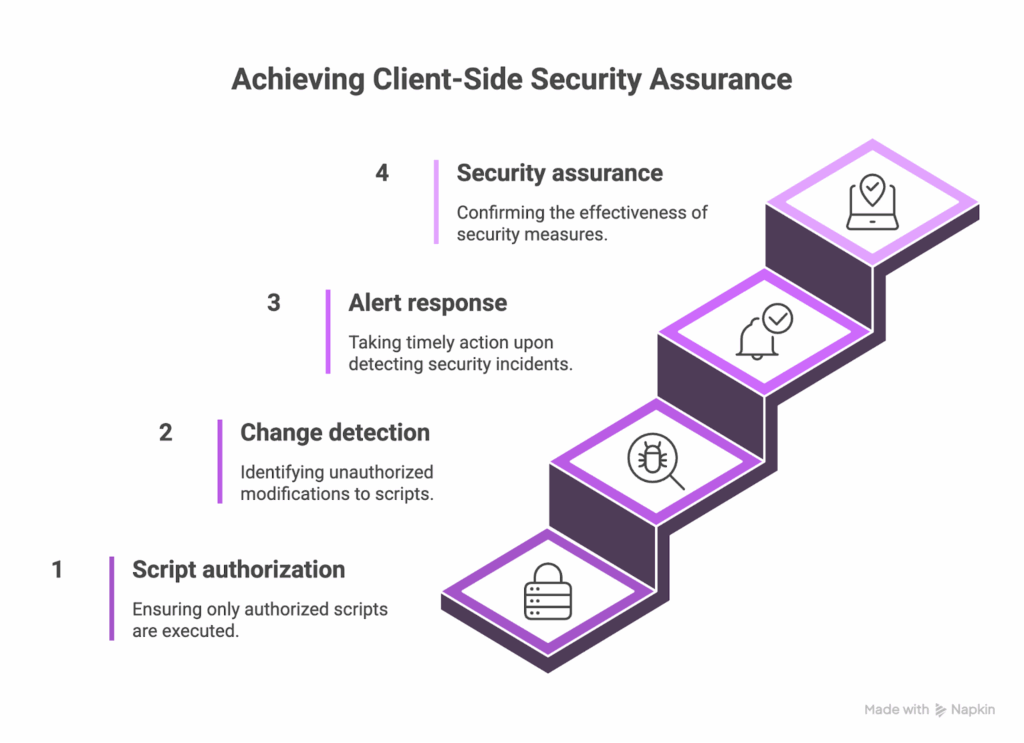
For PCI DSS 6.4.3 and 11.6.1, that confirmation it lives in the data. So when a QSA is there to assess, they want to see:
- How scripts are authorized.
- How changes are detected.
- How alerts drive action.
They measure whether you can see what’s happening in the browser, respond when something changes, and prove it after the fact. That’s the crux of client-side security assurance.
What QSAs evaluate
When assessing 6.4.3 and 11.6.1, QSAs look for more than configuration. This includes the entire control system across 4 areas:
1. Technical Controls
They review the tools and configurations that make script authorization, integrity validation, and detection possible.
This includes:
- Content Security Policy (CSP) headers
- Subresource Integrity (SRI) hashes
- Client-side monitoring (to detect changes in scripts or their behaviour)
- Proxy-based scanning solutions that evaluate the payment page as rendered in the browser.
QSAs confirm these controls aren’t just deployed, they’re active.
2. Operational Processes
Even the best tools fail if no one’s watching. QSAs assess how teams use those tools, i.e.:
- How scripts are approved
- How monitoring happens
- How alerts move through escalation
Typical evidence includes authorization workflows, change management tickets, alert routing maps, and incident escalation records.
3. Documentation
QSAs review policies, procedures, system settings, and inventories to ensure controls are defined and maintained over time.
Evidence often includes:
- Script inventory with business or technical justification.
- Approval records showing authorization dates and approvers.
- Monitoring logs proving the frequency of detection checks.
- Incident response procedures tied to alert management.
4. Effectiveness
QSAs want to see that alerts trigger investigations, and that investigations lead to resolution. For this, they might demand:
- Detection logs.
- Live pen-test
Here’s what qualifies as evidence of performance:
- Logs showing detected changes and corresponding investigations.
- Closed incident tickets confirming remediation actions.
- Trend reports demonstrating control performance over time.
Assessment methodology
A PCI DSS assessment unfolds in stages. Here’s how QSAs move from questions to proof.
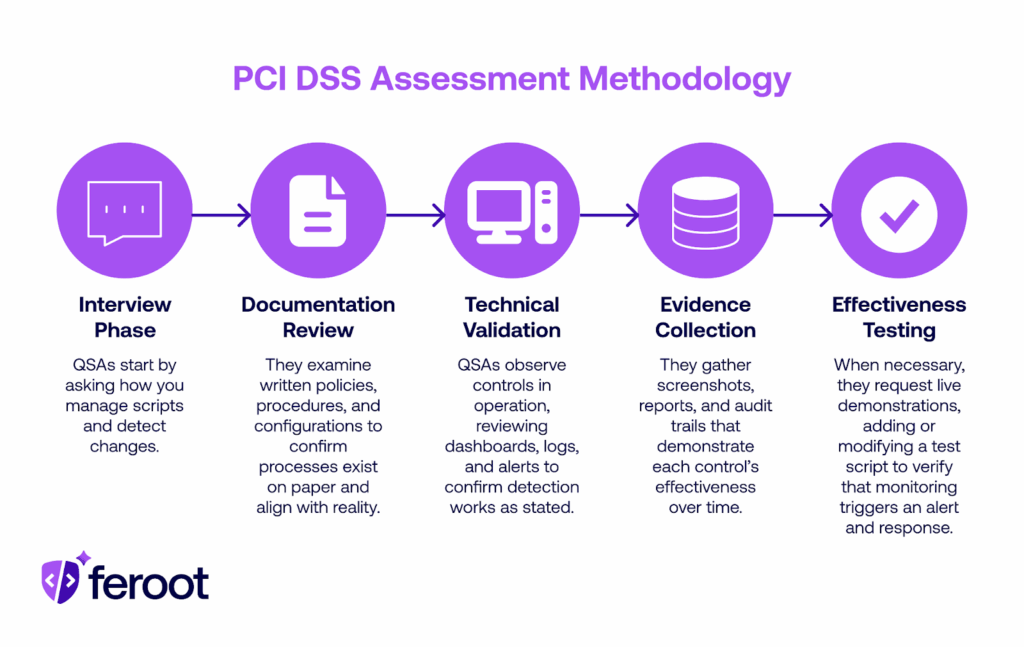
QSAs review your documentation, validate technical configurations, examine evidence, and test how well your controls perform in practice.
Common questions that QSAs ask
QSAs design their questions to uncover how your controls behave in real-world scenarios. Here are the most commonly asked questions:
1. How do you identify every script that executes on your payment pages?
This may be followed up with:
- What’s your discovery method (automated scan, manual review, tag manager inventory)?
- How often do you verify that the results are current?
2. What process authorizes a new script before it goes live or as soon as it changes?
Follow-up questions may include:
- Who owns the approval authority?
- Is the business or technical justification recorded and retained?
3. How do you validate script integrity over time?
QSAs may ask:
- Do you use CSP, SRI, or behavioral monitoring?
- How do you handle scripts that update dynamically or from third parties?
4. What mechanism alerts you to unauthorized changes or missing defenses?
They might follow up with:
- Does monitoring include both scripts and HTTP headers?
- How frequently does detection run—continuous, weekly, or TRA-defined?
5. Who receives alerts, and how quickly are they expected to respond?
QSAs can further follow up with:
- Is there a defined escalation path or SLA for response?
- How is each alert tracked and resolved?
6. How is your script inventory maintained and verified?
Follow-up questions can include:
- Where is it stored, and who owns its accuracy?
- When was it last reviewed, and how do you prove that?
7. What happens after a change is detected?
QSAs can follow up with:
- Is there a documented incident response step?
- How does the finding connect to remediation and reauthorization?
List of required evidence to fulfil requirement 6.4.3
QSAs expect evidence that every script on your payment pages is known, approved, and unchanged from its authorized state.
They primarily look for three types of evidence for 6.4.3:
- Complete inventory
- Documented authorization process
- Ongoing integrity validation that confirms nothing has drifted.
So let’s look at what kind of evidence QSAs expect when it comes to inventory.
1. Evidence of script inventory
QSAs ask for a complete, up-to-date inventory of all scripts executing on payment pages — both first-party and third-party — along with a clear reason each exists.
Besides the filenames, assessors want to see why each script is necessary, who owns it, and when it was last reviewed.
So, expected evidence for the script might include:
- A current inventory listing all scripts, their sources (CDN, internal, third-party vendors), owners, and approval dates.
- Business or technical justification for each script’s inclusion (analytics, fraud detection, checkout logic, etc.).
- Documentation showing when the inventory was last verified and by whom.
- Automated discovery reports or scans validating that what runs in the browser matches what’s in the record.
Next up, QSAs want to validate your authorization processes. Here’s how they do it:
2. Evidence for the authorization process
PCI DSS 6.4.3 requires that every script loaded on a payment page be explicitly approved, either before it’s deployed or immediately after a change.
So QSAs look for a repeatable workflow that connects script requests, approvals, and deployment.
Here is the evidence QSAs typically request to validate authorization processes:
- A documented policy describing how scripts are approved and by whom (ties to PCI DSS Req. 6.1.1 and 6.1.2).
- Change management tickets or workflow records showing approval steps, timestamps, and approvers.
- Approval logs for new scripts or updates, including business or technical justification.
- Periodic revalidation records showing that previously approved scripts were re-reviewed (quarterly or risk-based cadence).
- Access control logs confirming that only authorized personnel can modify payment page scripts.
For example, here’s what strong evidence may look like:
A unified workflow ( ideally automated ) that captures approvals, justifications, and version history in one place. It shows who approved what, when, and why, without needing to chase down multiple threads of emails.
3. Evidence to validate integrity
Authorization gives you control over what should run. Integrity validation confirms that what is running matches that expectation.
It’s about proving your system or processes that continuously compare current browser-side scripts against a known-good baseline to detect unauthorized modification
Evidence QSAs typically request:
- Baseline documentation: A record of approved scripts, including their hash or version identifiers at the time of authorization.
- Configuration exports: Screenshots or settings from integrity mechanisms (e.g., SRI tags, behavioral monitoring, or validation tools).
- Validation reports: Logs showing when integrity checks were last executed and what they detected.
- Change alerts and resolutions: Evidence that detected changes generated alerts, triggered an investigation, and led to documented remediation.
- Proof of frequency: Documentation that validation runs continuously or at a defined cadence (per Requirement 12.3.1).
Ultimately, QSAs are simply evaluating confidence in your process, your evidence, and your ability to detect what shouldn’t happen.
Here’s all of that at a glance:
| Expectation | What QSAs look for |
| Complete inventory | Every active script is accounted for, justified, and reviewed regularly. |
| Consistent authorization | Documented approval for each script addition or change, with clear business or technical justification. |
| Active integrity validation | Continuous or risk-based validation that detects real script or header changes, not just source mismatches. |
| Operational proof | Logs, reports, and tickets showing controls operate continuously. |
| Demonstrated responsiveness | Evidence that alerts are acted on and incidents are logged, investigated, and closed. |
Required evidence for requirement 11.6.1
11.6.1 is the detective side of the client-side security equation, the mechanism that alerts you when a payment page is modified as received by the consumer’s browser.
Here’s a list of evidence required to prove this
1. Evidence to prove the change-detection mechanism
QSAs look for proof that you actively monitor payment pages for unauthorized changes. This includes scripts, HTML, and key HTTP headers.
So QSAs expect evidence like:
- Documentation describing detection scope (headers + scripts).
- Logs or reports showing continuous or weekly monitoring.
- TRA if using custom monitoring frequency.
- Output confirming monitoring happens as rendered in the consumer browser.
- Sample detection events with timestamps and actions taken.
Weekly scanning satisfies this compliance criterion, but continuous monitoring proves security.
2. Evidence of performance of the alerting process
QSAs want to see how alerts move, all the way from detection to action.
Here’s the kind of evidence they expect to see:
- Alert configuration showing triggers and notification channels.
- Escalation matrix defining who gets notified and when.
- Alert logs with timestamps showing prompt delivery.
- Integration proof that alerts feed into the SOC or IR workflow.
Every alert should trace cleanly from generation to investigation to closure.
3. Evidence for response procedures
QSAs verify that detected changes trigger a defined, documented response.
Here’s the evidence they expect:
- Incident response plan, including payment page tampering scenarios.
- Tickets or case records showing investigation and remediation steps.
- Links between detection alerts and follow-up actions.
- Proof of integration with SIEM or SOC workflows.
In the eyes of QSA, detection without response isn’t protection, it’s just noise.
How PaymentGuard AI addresses QSA Requirements
The gap between what’s authorized and what’s actually running in the browser is the exact gap QSAs are trained to test.
PaymentGuard AI closes that gap by automating discovery, validation, and detection. This way, payment pages meet the intent of PCI DSS Requirements 6.4.3 and 11.6.1 by design.
It turns compliance from a once-a-year effort into a continuous control system. It discovers every script, verifies its integrity, detects unauthorized changes, and documents every action for audit review.
1. It automates script discovery and authorization
PaymentGuard continuously scans all payment pages, iFrames, and checkout flows to identify every executing script.
Then, It automatically catalogs script source, owner, and purpose, and builds a live inventory that updates whenever a change occurs. This becomes the single source of truth for approved scripts, giving QSAs clear visibility into what’s authorized and why.
2. It verifies integrity continuously
Once a script is approved, PaymentGuard tracks its integrity in real time.
It detects unexpected code changes, behavioral shifts, or new network calls that signal tampering.
3. It triggers contextual alerts in real-time
PaymentGuard continuously monitors payment pages as they render in the consumer’s browser, detecting any modification to scripts or security-impacting HTTP headers. When a deviation appears, it instantly alerts the right teams with context.
4. It keeps you audit-ready
Every alert is logged, escalated, and tracked through resolution. This way, it generates clear, structured evidence, including screenshots, timestamps, and event trails, that are ready for QSA validation.
5. It’s ready to work straight out of the box
Deploying PaymentGuard takes minutes. A few minutes of setup activate full visibility, real-time monitoring, and continuous compliance across all payment environments.
Together, these capabilities operationalize the full lifecycle of PCI DSS compliance:
- Requirement 6.4.3: PaymentGuard defines what’s authorized, maintains justification, and validates integrity.
- Requirement 11.6.1: It detects when that state changes, alerts personnel, and records every response.
FAQ
Can we satisfy these requirements with manual processes?
Yes, but only in small, simple environments. PCI DSS allows manual compliance for 6.4.3 and 11.6.1 as long as you can show a complete script inventory, documented approvals, and evidence that monitoring actually occurred. In practice, manual reviews don’t scale because scripts update too often, third parties change code, and audit evidence quickly becomes outdated. You need an automated solution like Feroot.
What if we just implemented controls recently?
You can still pass, but you must show they’re working. QSAs accept recently deployed controls if you can demonstrate that they’re active. Provide current logs, screenshots, and at least one monitoring cycle matching your defined frequency. If you claim weekly scans, show a completed run or a targeted risk analysis (TRA) explaining any deviation. No evidence means the control isn’t considered in place.
Do QSAs require specific tools or technologies?
No, PCI DSS is technology-agnostic. The Council defines outcomes, not products. But doing it manually can be challenging. You can depend on Feroot’s PaymentGuard to meet the requirements and curb compliance drift. What QSAs care about is coverage, accuracy, and proof that the solution continuously runs, and that’s exactly what Feroot’s PaymentGuard is designed to deliver.
How much historical data do we need?
Enough to prove consistent operation. QSAs expect to see recent monitoring or detection logs, reports, and alerts that demonstrate the control wasn’t turned on just for the audit. If your organization uses a targeted risk analysis to justify a custom frequency, that documentation must also be available. Maintaining 30–90 days of records is a practical baseline for showing continuity and reliability.


