
By the time you reach PCI DSS 4.0.1 Requirements 6.4.3 and 11.6.1, the easy wins are behind you. This is the point where compliance turns into configuration. Tag managers, consent scripts, and payment flows all intersect here, and the guidance feels just vague enough to slow everything down.
Which tag rules belong in scope? How do you prove a script was authorized? What’s the right way to detect a change without flooding alerts?
What you’ll learn in this article:
- Operational implementation of Requirements 6.4.3 and 11.6.1 with real tag manager configurations, CSP headers, and the evidence pack format QSAs expect
- Working patterns for GTM, Adobe, and Tealium, including consent settings, allowlists, version control, and weekly monitoring workflows
- Edge cases like single-page apps, payment iframes, shadow IT, and marketing exceptions that stretch scope definitions
This guide sits in that middle ground between the standard and the screen. It shows what these requirements look like when they’re implemented, logged, and reviewed by a QSA. Real configurations, working runbooks, and evidence that holds up under audit.
Requirements overview
What 6.4.3 means operationally
Requirement 6.4.3 introduces a new discipline for run-time governance. It expects you to:
- Maintain a full inventory of all scripts executing on payment pages.
- Justify each script’s business purpose, showing why it’s necessary for page function or compliance.
- Establish authorization workflows for approving new or modified scripts.
- Implement verification mechanisms ensuring only authorized scripts run.
In practice, that means your tag manager, CI/CD pipeline, or external scanner must sync to a single source of truth for scripts. Each item should have metadata fields such as:
{
“script_name”: “stripe-checkout.js”,
“owner”: “Payments Engineering”,
“justification”: “Processes card payments”,
“approved_by”: “AppSec Manager”,
“approval_date”: “2025-07-10”,
“last_verified”: “2025-10-15”
}
This JSON or CSV inventory becomes your baseline artifact for audit evidence and ongoing change detection.
What 11.6.1 means operationally
Requirement 11.6.1 moves from governance to detection. It requires:
- Technical tamper detection mechanisms capable of alerting when script content or behavior changes.
- Weekly minimum monitoring (though continuous monitoring is preferred).
- Documented response procedures for investigating and remediating unauthorized changes.
At a technical level, 11.6.1 involves comparing script integrity over time. This can be achieved through:
- Subresource Integrity (SRI) hash validation on static scripts.
- Behavioral change detection through DOM monitoring or external scanning tools.
- Alerting integrations to SIEM or ticketing systems for incident response.
A sample control statement might read: “All production payment pages are monitored continuously for unauthorized script or DOM changes using automated detection. Alerts trigger within 5 minutes and feed directly into our SOC workflow.”
Common Misconceptions
Many teams assume Content Security Policy (CSP) alone satisfies these requirements, but it doesn’t. CSP prevents new unauthorized scripts from loading, but it doesn’t detect changes to approved scripts or data flows. PCI DSS 4.0.1 expects active verification and alerting, not static prevention.
Tag manager implementation patterns
Requirements 6.4.3 and 11.6.1 are where most teams feel the weight of operational detail. Tag managers are the center of that work. They coordinate analytics, consent tools, and marketing pixels that all touch the payment experience. Configured correctly, they support compliance. Left open, they blur the line between authorized and unknown code.
Feroot has seen every variation: from global banks with locked-down Adobe libraries to startups managing checkout flows through GTM. The approach that works best is consistent: define what’s allowed, control who can publish it, and keep a verified record that maps each script to its purpose.
| Feature | Google Tag Manager | Adobe Experience Platform | Tealium iQ |
| Built-in consent management | Yes (Consent Mode) | Yes (Privacy Service) | Yes (Consent Manager) |
| Version control | Container versions | Library builds | Profile versions |
| Approval workflow | Manual (workspace approval) | Built-in (library approval) | Manual (publish workflow) |
| Audit trail | Change history log | Audit tab in library | Activity log |
| Best for 6.4.3 | Allowlist + consent config | Library structure + labeling | Load rules + profile segmentation |
| Best for 11.6.1 | Weekly container exports | Library comparison logs | Profile snapshots |
| QSA evidence | Container JSON + change log | Property export + approval records | Profile export + execution logs |
Google Tag Manager
In GTM, compliance starts with consent and control. Use Consent Mode to align analytics execution with user permissions. Configure it at the container level so every tag inherits the same logic.
{
“consent_settings”: {
“analytics_storage”: “granted”,
“ad_storage”: “denied”,
“functionality_storage”: “granted”
}
}
Next, maintain an allowlist of approved script URLs. This simple check prevents new tags from firing unless they’re explicitly authorized.
const approvedScripts = [
“https://www.googletagmanager.com/gtm.js”,
“https://cdn.paymentvendor.com/checkout.js”
];
if (!approvedScripts.includes({{Tag URL}})) {
return false;
}
To maintain visibility, schedule a weekly container export. Each export becomes a timestamped record of configuration state. Combine it with audit logs showing who made changes and when.
When your QSA reviews the setup, they’ll want to see four things:
- The current container export (JSON format)
- Consent configuration screenshots
- Change logs showing version control
- Evidence that every tag has a documented business justification
Adobe Experience Platform Tags
Adobe’s tag manager rewards structure. Create dedicated libraries for development, staging, and production. Require review before each build moves forward. Label every rule using a consistent pattern such as:
[Purpose]_[Owner]_[ApprovalID]
This helps your auditor trace intent without sorting through ambiguous names like “Test Rule” or “Promo Tag.”
Keep a dataLayer map that links each rule to the data it collects. That single reference sheet helps you prove both necessity and control.
When it’s time for audit, your QSA will expect clear documentation that shows both structure and accountability. Keep the property export file as your primary reference, along with version comparison logs that trace each library change. Include execution logs that confirm when and how rules ran in production, and maintain the approval records linked to each deployment. Together, these artifacts show that every tag has been built, reviewed, and published through a defined governance process.
Tealium iQ
Tealium’s strength is segmentation. Use load rules to define exactly where payment scripts fire and to keep them separate from general marketing tags. For instance:
URL contains /checkout
OR
hostname equals pay.example.com
Restrict sensitive scripts to the “page load” scope. Then, create a dedicated Tealium profile for payment pages. It simplifies monitoring and allows you to apply different change-control rules than your broader site.
For audit evidence, keep a complete record of your configuration and activity. That includes the exported Tealium profile that captures your current setup, the load rule definitions that show exactly when scripts run, and the tag execution logs that confirm those rules behaved as expected. Round it out with an extension inventory listing every run-time script and its business justification. Together, these form a clear trail of control that a QSA can follow from policy to proof.
Keep one source of truth
A tag manager shows what is configured, not always what runs. Maintain a separate, continuously updated external script inventory that matches what’s discovered on live pages. That file becomes your control anchor for 6.4.3.
Example format:
script_name,source_url,owner,justification,approval_date,last_verified
stripe-checkout.js,https://js.stripe.com/v3/,Payments,Payment processing,2025-06-12,2025-10-15
meta-pixel.js,https://connect.facebook.net/en_US/fbevents.js,Marketing,Ad analytics,2025-07-01,2025-10-14
The goal is traceability. Every script should have a known owner, a defined purpose, and a verified record. That’s what turns Requirement 6.4.3 from a list item into an operational safeguard.
CSP and SRI implementation
Most teams start here when securing browser-based code, and for good reason. A strong Content Security Policy (CSP) and Subresource Integrity (SRI) together reduce risk from unauthorized scripts. Still, PCI DSS 6.4.3 and 11.6.1 require more than prevention. They expect clear controls, verifiable checks, and evidence that detection is ongoing.
A good implementation keeps analytics and tracking functional while ensuring every external script is known and verified. CSP limits what can load. SRI confirms that what loads hasn’t changed. The goal is balance: security without silencing legitimate business tools.
Content Security Policy (CSP)
A CSP defines which domains can serve scripts and resources on your payment pages. It prevents unknown sources from injecting code, but it only works as well as it’s maintained.
A typical before header looks like this:
Content-Security-Policy: default-src *; script-src * ‘unsafe-inline’; connect-src *; img-src *;
This broad configuration allows nearly anything to run. It’s compliant only on paper.
A tuned after version restricts execution to specific, justified domains:
Content-Security-Policy: default-src ‘none’;
script-src ‘self’ https://js.stripe.com https://www.googletagmanager.com;
connect-src ‘self’ https://api.example.com;
img-src ‘self’ https://www.google-analytics.com;
style-src ‘self’ ‘unsafe-inline’;
This approach meets the intent of 6.4.3 by explicitly authorizing script sources and giving you a concrete artifact to present to auditors.
Maintain version control for CSP updates and keep a short changelog showing who approved each adjustment. During the audit, that record demonstrates governance over configuration changes, not just technical enforcement.
Subresource Integrity
SRI protects against tampered scripts by verifying their cryptographic hash before execution. It’s especially valuable when you load code from a third-party CDN.
Without SRI, a script could change upstream without notice:
<script src=”https://cdn.paymentvendor.com/checkout.js”></script>
With SRI, the browser validates content before it runs:
<script src=”https://cdn.paymentvendor.com/checkout.js”
integrity=”sha384-K3p1xLzYZg1vFJt2zT27PzRvbwWy…”
crossorigin=”anonymous”></script>
When your vendor releases a new version of their script, download the updated file and generate a fresh integrity hash before it goes live. Validate that hash, have it reviewed and approved through your normal change process, and record the update in your script inventory. This keeps the control chain intact from versioning to verification, showing that every change was intentional and accounted for.
Why headers alone don’t close the compliance gap
When a vendor updates their script, treat it as part of your normal governance flow. Pull the new version, generate a new integrity hash, and have a second set of eyes confirm it before deployment. Update your script inventory so it reflects the change. This simple rhythm keeps your integrity controls reliable and your audit trail clean. It’s the kind of quiet discipline that turns compliance into assurance.
Putting it all together
A strong CSP defines the guardrails. SRI verifies integrity. Automated monitoring closes the loop by detecting what slips through. Together, they create the balance PCI DSS 4.0.1 aims for: proactive control backed by proof that you’re watching the right things, at the right frequency.
The weekly control group
The weekly control loop keeps your controls alive.
Each week, the review covers three simple questions:
- Has anything new appeared at run-time script inventory?
- Did an approved script change in code or behavior?
- Have any security headers drifted from the approved configuration?
If a new script shows up, trace its source and confirm it was approved. A brief note explaining who added it and why is often enough. Over time, this practice builds a visible pattern of control that auditors trust.
When an existing script changes, compare its new hash and data flow to the previous version. If the update is legitimate, record the change and update the baseline. If not, follow your incident process and record the outcome.
For headers, compare the current configuration to last week’s snapshot. Minor differences usually trace back to routine maintenance or deployment cycles. Log the reason, confirm ownership, and close the check.
This weekly rhythm is where Feroot PaymentGuard creates the most value. It automates the inventory updates, monitors for behavioral changes continuously (not just weekly), and generates the evidence pack format QSAs expect. The control loop stays intact, but the manual work drops from 2-4 hours to a 15-minute review.
The weekly evidence pack should include a few predictable items:
- The latest monitoring report showing new or changed scripts
- A record of manual review or approvals tied to that week’s activity
- Any screenshots or exports showing header or tag updates
Over time, this loop feels less like a control and more like muscle memory. Each cycle adds quiet proof that your site behaves as expected and your security posture holds steady between audits.
Evidence pack for your QSA
A strong evidence pack shows that your controls work in practice. It helps your QSA see how your team manages authorization, detection, and review without needing to interpret every log. The goal is not to impress but to clarify.
The best evidence packs are simple and consistent. They contain what matters most:
- The full inventory of scripts, showing their purpose, ownership, and approval history
- The authorization matrix for Requirement 6.4.3
- The weekly alert and monitoring summaries from your detection tools
- The record of your CSP and header configurations over time
- Screenshots or exports that confirm what was live during each review
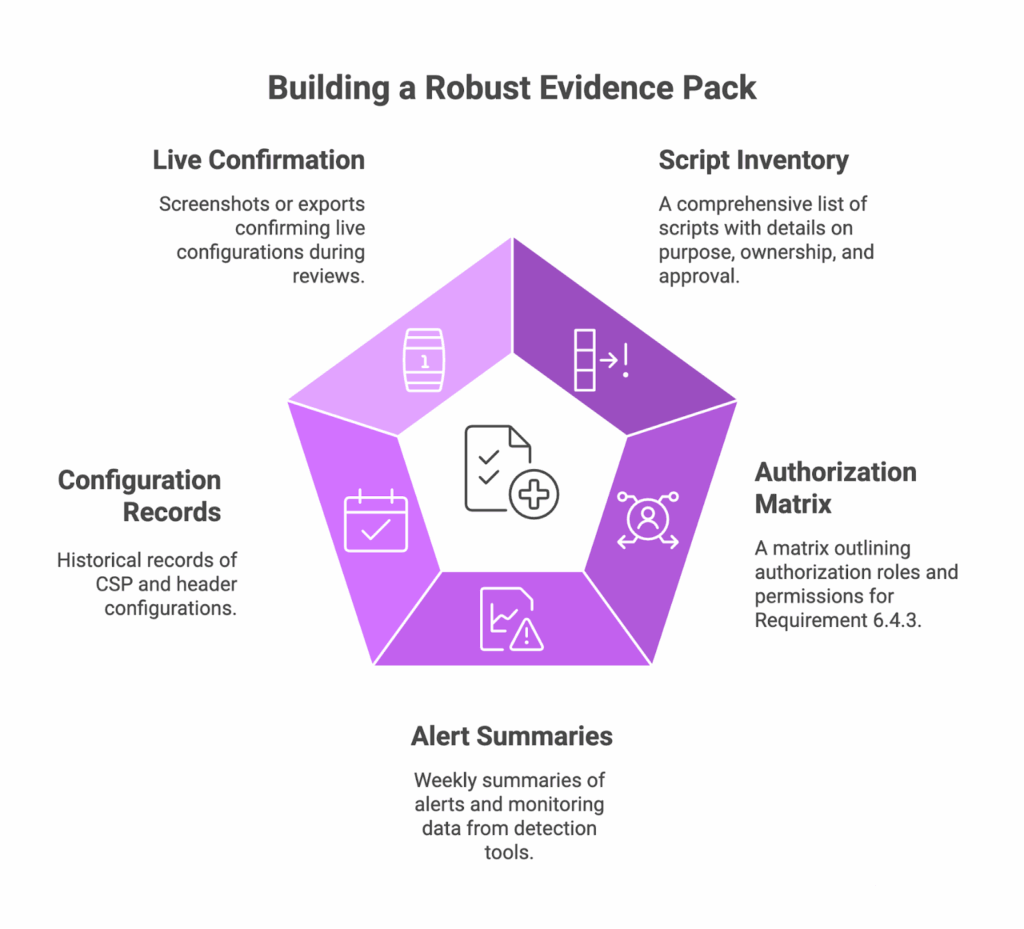
Together, these records give your auditor a complete view of how you maintain compliance every week, not just during audit season. Each file should include a clear title, date, and owner so that anyone can follow the trail without explanation.
Keep the evidence pack alive throughout the year. Update it after every weekly control cycle instead of treating it as a separate project. The information stays current, and your QSA walks into an environment that already proves itself.
What auditors look for is straightforward. They want to see that your records are complete, accurate, owned by accountable teams, and reviewed often enough to be trusted. When these qualities show through, you demonstrate control without needing to overexplain it.
When you maintain this kind of discipline, your documentation becomes a reflection of your security posture. It tells a quiet but clear story: the system is governed, the process is repeatable, and the risks are under control.
Edge cases and pitfalls
Even with a solid framework, run-time controls rarely stay neat. Real-world sites are full of edge conditions that stretch the definition of “in scope.” Understanding them early keeps your compliance program grounded.
Single-page applications often inject scripts dynamically. These scripts can appear or disappear without a full page reload, which means traditional scanners may miss them. In these cases, rely on behavioral monitoring that observes actual DOM activity, not just static code. Align this monitoring with your inventory process so each detected script can be reviewed and justified.
Third-party payment iframes can also create confusion. Some teams assume they are fully out of scope because the cardholder data entry happens elsewhere. That is only true if the iframe content and scripts are entirely managed by the payment processor. Any script running on your host page that interacts with that iframe remains in scope.
“Tag-less” pixels are another gray area. These are small image requests that trigger data collection without visible code changes. They should still appear in your tracking inventory with a clear justification of their purpose.
Shadow IT is a quieter problem. It often appears when marketing teams import containers or deploy campaign-specific scripts without security review. These shortcuts create drift between the approved configuration and what is running in production. The best countermeasure is visibility. Automated discovery paired with a simple internal communication process keeps changes transparent and auditable.
Marketing hotfixes and campaign deadlines often lead to last-minute exceptions. The right move is not to block them but to formalize how they are reviewed after deployment. A short post-change verification step closes the loop and keeps you within the intent of 6.4.3.
Defining scope for payment pages is another place where organizations hesitate. Some treat only the checkout as sensitive, while others include any page leading to a transaction. The safer approach is to define “payment page” based on data exposure, not URL structure. If a script has access to payment or personal data, it belongs in scope.
The point is not to catch every anomaly in advance but to build habits that make exceptions visible, traceable, and reviewed. Quiet consistency wins over perfect foresight.
Role-based quick starts
Compliance runs more smoothly when everyone understands their part. The work looks different depending on where you sit, but the goal is shared: stable, verified control.
For CISOs and QSAs, success means visibility. Review the weekly reports, check that authorizations are current, and confirm that the evidence pack reflects what is truly in production. A short monthly review meeting often covers everything needed for peace of mind before audit season.
Marketing operations teams need clear guardrails. They can still run campaigns and test new tags, but changes to the payment path should follow the same review process as code deployments. A simple rule helps: if it runs where card data might be present, it requires approval. Documenting that understanding avoids friction later.
AppSec and platform owners are the steady hands in this process. Their focus should be maintaining the control loop and keeping evidence current. A week-by-week timeline usually works best. The first weeks establish baselines and approvals, followed by regular verification cycles. Once in motion, the process becomes easier to sustain than to restart.
The privacy office has an overlapping role. Their coordination helps align data-use justifications with script authorizations. When privacy teams and security teams share a single inventory, both sides get a clearer view of what data leaves the site and why.
Each role contributes to the same outcome: confident control without disruption. By dividing ownership early, you turn PCI DSS 4.0.1 compliance from a one-time project into a normal operating pattern. It becomes part of how the organization works, not something it scrambles to prove.
Frequently Asked Questions
Can we just use CSP and call it done?
No. CSP prevents unauthorized scripts from loading, but it doesn’t detect when an approved script changes its behavior or starts exfiltrating data. That’s why 11.6.1 requires active monitoring, not just preventive controls. Think of CSP as the guest list and monitoring as the security cameras that confirm guests behave as expected.
How do we handle marketing’s campaign deadlines?
The right move is not to block campaigns but to formalize post-deployment review. Deploy the tag, document it within 24 hours, and run a verification check in your next weekly cycle. This keeps campaigns moving
Are single-page apps fully in scope?
Yes, if they touch payment data. SPAs inject scripts dynamically, so traditional scanners miss them. Use behavioral monitoring that observes actual DOM activity rather than static code analysis.
What if our payment processor manages the iframe?
The iframe content may be out of scope, but any script on your host page that interacts with that iframe remains in scope for 6.4.3 and 11.6.1.
Summary
Requirements 6.4.3 and 11.6.1 create a discipline most organizations haven’t practiced before: proving that browser-based code stays authorized and unchanged between audits. The work is straightforward but persistent. Inventory, justify, detect, review, document.
Feroot PaymentGuard was built specifically for this rhythm. It maintains the script inventory automatically, detects behavioral changes in real-time, and generates the evidence pack your QSA expects without manual exports. The controls you built stay in place. The proof becomes continuous.
Disclaimer: Feroot helps automate monitoring and evidence collection, but we do not guarantee compliance or that you will pass any PCI DSS audit. Audit outcomes depend on your implementation, scope, compensating controls, and your QSA’s independent judgment.


