Most HIPAA violations now involve websites and tracking technologies. Standard website tools like analytics, pixels, session replay, and chat create regulated data flows that many teams have never instrumented or reviewed.
We’ve seen this play out in public: investigations and lawsuits involving Blue Shield of California and Novant Health showed how ordinary tracking technologies can expose Protected Health Information (PHI) at scale.
What you’ll learn in this article:
- 15 recognizable scenarios showing how standard tools (Google Analytics, Meta Pixel, chatbots, session replay) create HIPAA violations when deployed without proper controls
- Technical patterns behind recent enforcement cases like Novant Health and Blue Shield, so you can identify similar risks on your own patient-facing pages
- Practical fixes for each scenario, including governance workflows, configuration changes, and continuous monitoring approaches that keep everyday website tools from crossing HIPAA lines
The following 15 HIPAA violations translate those enforcement patterns into scenarios you can recognize on your own site. We focus on the usual suspects like Google Analytics, Meta/Facebook Pixel, session replay tools, chatbots, and other third-party scripts, and why they cross HIPAA lines when misconfigured or left unmonitored.
These are mainstream tools on mainstream websites. If you’re using them without explicit controls, Business Associate Agreements (BAAs), and continuous Run-time monitoring, you may be at risk, even if your servers and EHRs are locked down.
Common Healthcare Website Tools: HIPAA Eligibility
| Tool Category | Common Examples | Will the vendor sign a BAA? | Risk Level on PHI Pages |
| Analytics | Google Analytics, Adobe Analytics | Google: No (GA), Yes (GA360 with GCP) Adobe: Yes (with signed BAA) | High – captures URLs, events, page context |
| Session Replay | Hotjar, FullStory, LogRocket | Most: No or limited | Very High – records keystrokes, form data |
| Marketing Pixels | Meta Pixel, LinkedIn Insight, TikTok Pixel | No | High – links identity to health context |
| Chat/AI | Intercom, Drift, ChatGPT plugins | Varies by vendor | High – conversations contain symptoms/history |
| Tag Managers | Google Tag Manager, Adobe Launch, Tealium | Google: No BAA needed (container only) Adobe/Tealium: Yes (BAA available) | Medium – depends on what tags it loads |
| CDNs | Cloudflare, Fastly, Akamai | Yes (most offer BAAs) | Low – typically don’t access PHI if configured correctly |
| A/B Testing | Optimizely, VWO, Google Optimize | Optimizely: YesVWO: YesGoogle Optimize: No | Medium – depends on test targets |
Google Analytics violations
Google Analytics is not HIPAA-eligible, and Google does not sign BAAs for GA. Yet it’s still embedded on many patient-facing pages. Here’s how:
Disclaimer: The HIPAA violations examples below are for informational purposes only and do not constitute legal advice. Organizations should consult their compliance or legal teams regarding HIPAA applicability.
Scenario 1: Default GA4 capturing form data
A hospital upgrades to GA4 and leaves the default “Enhanced Measurement” on. Without anyone noticing, GA4 starts logging page URLs and “form submit” events. When a form plugin inserts names or appointment details into the URL, those details flow to Google.
That’s PHI sent to a vendor who won’t sign a BAA. Here are three things you can do to ensure this doesn’t happen to you:
- Switch forms to the HTTP POST Method (sending form data in the body of an HTTP request, not in the URL)
- Redact any query parameters
- Turn off or narrowly scope Enhanced Measurement across all areas where patients enter information
Scenario 2: URL parameters exposing PHI
Let’s say a developer ships appointment links like “/book?name=Jane&reason=oncology”. GA4 logs page URLs by default, so those parameters ride along to Google, which won’t sign a BAA for Analytics.
That’s an impermissible disclosure and a violation of Google policy. In our experience, this is best mitigated by avoiding the use of PHI in URLs. Send sensitive fields via POST and add server- and run-time filters to strip any parameters that might still appear in logs.
Scenario 3: IP address + health pages = PHI
Take an example of analytics runs on oncology, mental-health, or pregnancy pages. Even without storing IPs, GA4 can combine other identifiers with page context in ways that create PHI. And Google Analytics is not HIPAA-eligible.
OCR’s tracking guidance still applies anywhere patients log in or type information, so in practice the move is simple: keep analytics off PHI-heavy paths and trim what you collect down to the bare minimum needed to run the site.
This is where automated run-time monitoring becomes necessary. Manual audits can’t catch these data flows because they happen in milliseconds in the browser. Tools like Feroot HealthData Shield AI continuously monitor which data each script accesses and block unauthorized PHI transmission in real time.
Meta/Facebook Pixel violations
If your team uses Meta Pixel for ads or retargeting, it’s easy to forget that every page view becomes a data signal. On healthcare sites, those signals can reveal sensitive context. Here are some examples where HIPAA regulations are violated:
Scenario 4: Retargeting Pixel on condition pages
Marketing enables the Meta Pixel on specialty pages (oncology, mental health, fertility) to build audiences. That pixel can link a person to a specific condition and fuel health-related ads, effectively segmenting by health status, without a BAA.
To avoid this, make sure to remove pixels from any page that implies a diagnosis, treatment, or future care intent.
Scenario 5: Meta Pixel in patient portal
A site-wide Meta Pixel seems convenient, until you remember it’s also running inside the authenticated patient portal. Every page view there can quietly send portal URLs and events to Meta, effectively building a health profile tied to that browser.
The safer pattern is strict, no third-party marketing tags in logged-in areas, ever. Use your tag manager to enforce allowlists for portal routes and review those rules regularly so “one quick change” doesn’t reopen the door.

Session replay tool violations
Session replay seems harmless, but on healthcare sites, it can result in PHI being recorded through keystrokes, form entries, and even portal content. Because most replay vendors won’t sign BAAs, those recordings live on third-party servers outside your HIPAA boundary.
Scenario 6 – UX team adds Hotjar to the patient portal
A designer turns on Hotjar to see how patients navigate the portal. The tool captures login flows, patient views, types of medical history, medications, and messages. It then stores the videos on Hotjar’s servers (no BAA).
That’s a PHI disclosure. The guardrail is never to enable session replay in authenticated areas and to limit UX analysis to anonymized metrics.
Scenario 7 – Session replay on booking forms
To reduce drop-off in the booking flow, a clinic enables FullStory on appointment forms. The recorder logs every keystroke, such as names, date of birth, insurance, and symptoms, and transmits it back to the vendor.
That’s PHI leaving your environment. A safer path is to exclude all forms from replay, rely on funnel/field-level analytics without recording, and block sensitive fields by default.
Section 4: Chatbot and live chat violations
Chat feels helpful and low-stakes, but the moment patients describe symptoms, medications, or care history, those messages become PHI. Most chat/AI vendors won’t default to HIPAA terms, and transcripts typically live on third-party servers.
Scenario 8: AI symptom checker without BAA
A hospital launches an AI chatbot that asks about symptoms, medications, and history. The vendor stores conversations and may feed model training. That’s PHI outside your HIPAA boundary, and no BAA in place.
Here is what you can do: use chat vendors that offer HIPAA terms and sign a BAA before go-live. Where a BAA isn’t available, keep the bot away from PHI entirely: turn off data retention/model training on user content, limit it to non-clinical questions, and publish a clear use policy so patients know what not to share.
Scenario 9: Live Chat Collecting Health Questions
A clinic adds a generic live chat for convenience. Patients naturally ask, “Do you treat diabetes?” or “Can I refill my prescription?” which turns those messages into PHI sitting on a non-HIPAA chat platform.
The safer pattern is to use vendors that offer a HIPAA program and will sign a BAA for clinical conversations, or treat web chat as a triage layer only. Make it clear that medical questions are routed into a secure messaging experience, wire buttons and keywords to push patients into that HIPAA-eligible channel, and reserve basic chat for logistics like hours, directions, and billing status.
Section 5: Form and third-party script violations
Forms and tag managers may seem routine, but small implementation details, such as event labels added in GTM, can expose PHI at scale. Here are some HIPAA violation examples:
Scenario 10: Hidden event tracking on forms
Marketing adds “debug” events, such as form_submit with field values, to Google Analytics. Each submission now transmits names, phone numbers, or reasons for visit to a non-BAA vendor.
Never send field values to analytics, log only non-PHI metadata, and confine detailed diagnostics to HIPAA-covered systems.
Scenario 11: Autocomplete exposing PHI
The appointment form leaves browser autocomplete on. PHI typed into fields (symptoms, insurance ID) can be stored by the browser and synced to a patient’s cloud account, not your domain. Disable autocomplete on PHI fields, prevent caching, and keep sensitive inputs out of URLs and query strings.
Scenario 12: Marketing adds scripts without approval
A quick Google Tag Manager change drops LinkedIn and TikTok pixels site-wide, including portal and booking pages. Multiple third-party scripts now load where PHI is present, and no BAAs exist.
Fix it by enforcing tag-manager governance (owners, approvals, scope), blocking pixels on PHI paths, and requiring BAAs or hard-denying any vendor that could receive health signals.
Section 6: Mobile and advanced scenarios
What we’ve seen is that website governance often stops at the desktop. Real exposure lingers on legacy subdomains, microsites, and mobile Software Development Kit (SDKs), places that fall outside routine reviews.
Scenario 13: Legacy subdomain still running
Let’s say that a 2020 COVID-testing microsite remains live with Google Analytics enabled. Appointment queries and test results pages continue to generate events, leaking PHI for over 18 months. To avoid this, maintain a domain/subdomain inventory, set renewal/expiry owners, decommission unused properties, and run continuous run-time monitoring.
Scenario 14: Mobile app analytics SDKs
A patient app ships with Firebase Analytics and a social SDK. Usage telemetry reveals which records were viewed and which appointment types were scheduled.
Review every SDK for HIPAA eligibility, disable marketing/retargeting SDKs in health apps, prefer privacy-focused telemetry, and document data minimization in release checklists.
Scenario 15: In-app WebView loads portal with third-party trackers
A mobile app opens the patient portal inside a WebView. The embedded page inherits marketing tags and sends PHI-related events to third parties from inside the app.
Treat WebViews as part of your HIPAA surface and remove non-essential trackers on portal routes, disable third-party cookies, and restrict unauthorized JavaScript where feasible.
Common patterns
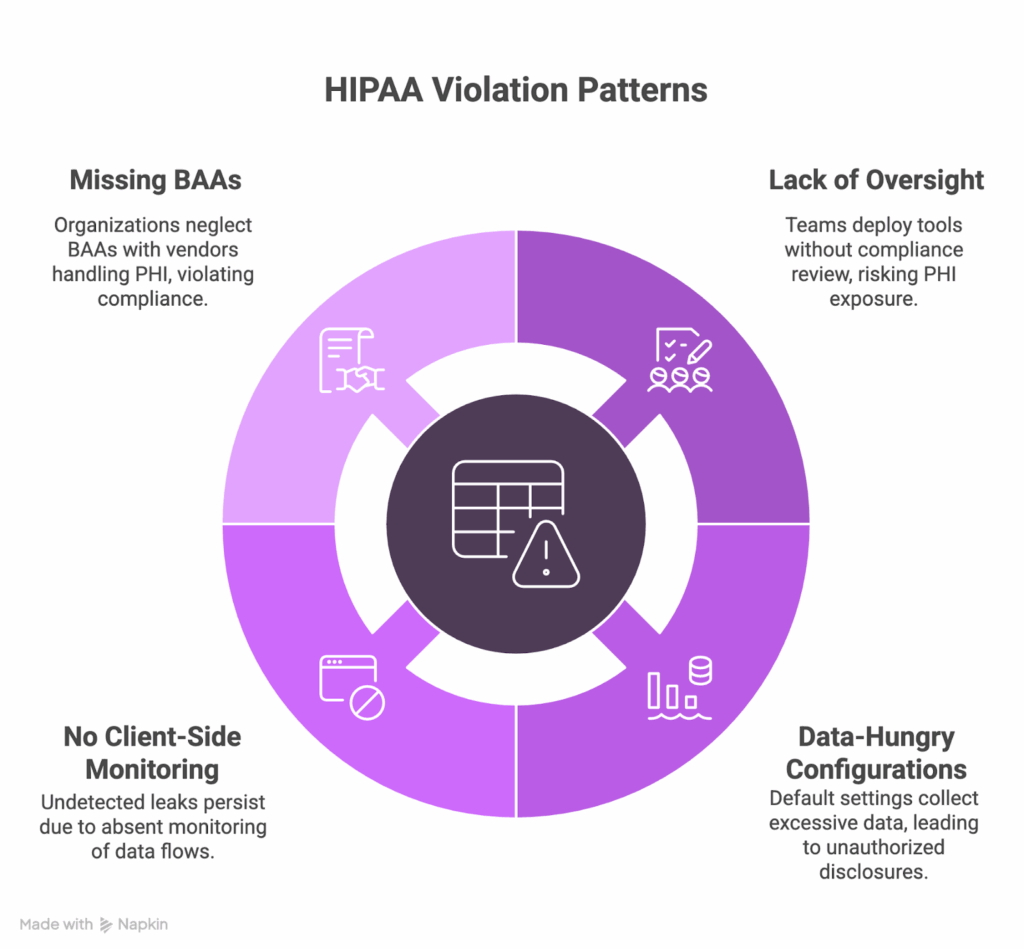
In our experience, website-related HIPAA issues start with everyday tools deployed without guardrails. For example, Novant Health approved a class action settlement after allegations that the Meta Pixel on patient-facing properties transmitted PHI; the federal court approved the settlement in June 2024. Analysis reveals consistent patterns:
Lack of oversight and change control
Teams frequently add analytics, pixels, chat, or A/B tools without a documented compliance review or approval workflow. OCR’s tracking-technology bulletin stresses BAAs/permissions and risk analysis before deploying tools that can receive PHI.
Default, data-hungry configurations
Out-of-the-box settings, such as collecting complete URLs, can transmit identifiers or page context to third parties if not minimized. OCR warns that disclosures of PHI to tracking vendors without proper permission/BAA are impermissible.
No run-time monitoring
Violations often persist because organizations don’t maintain a live inventory of scripts/tags and don’t monitor browser data flows, allowing leaks to go undetected until complaints or investigations arise. OCR has prioritized Security Rule compliance in investigations involving tracking tech.
Manual script inventories go stale within weeks. Feroot HealthData Shield AI maintains a live inventory automatically, detecting when new scripts appear or existing ones change behavior. This is the continuous visibility OCR’s guidance expects.
Missing or inappropriate BAAs
Organizations either assume common web vendors don’t need BAAs or proceed without them. OCR states that tracking vendors are business associates when they create/receive/maintain/transmit PHI for covered functions requiring BAAs or HIPAA-compliant authorizations.
How to avoid these scenarios
What we’ve seen work best is continuous visibility paired with simple guardrails that everyone follows.
1. Implement governance
Ship nothing without a compliance sign-off. Maintain a simple, documented approval workflow. Provide annual HIPAA web training for marketing/UX.
2. Inventory & monitor
Keep a complete, living inventory of all scripts across domains/subdomains. Enable automated detection for new/changed tags. Review monthly.
3. Lock down BAAs
Have a BAA for any vendor that could access PHI (analytics, chat, session replay, CDP, hosting). Track BAA status; remove tools from vendors that won’t sign.
4. Configure for privacy
Minimize by default: disable “collect everything,” anonymize IP where allowed, block field capture, use POST, exclude PHI pages from tracking, and redact replay by default.
5. Continuous education
Train web, marketing, and product teams on HIPAA website requirements. Update guidance as OCR issues new bulletins. Circulate real violation scenarios internally to reinforce guardrails.
Frequently Asked Questions
Does HIPAA really apply to our website if we’re just using standard marketing tools?
Yes. OCR’s June 2024 guidance clarified that tracking technologies on covered entity websites and apps are subject to HIPAA when they access or transmit PHI. The tools being “standard” doesn’t exempt them. What matters is whether PHI flows to third parties without proper authorization.
Can’t we just get consent from patients to use these tracking tools?
Patient consent alone doesn’t satisfy HIPAA. You need either a BAA with the vendor (making them a business associate) or a valid HIPAA authorization that meets specific requirements under 164.508. A cookie banner isn’t enough.
Our analytics vendor says they’re “HIPAA compliant.” Does that mean we’re covered?
Not necessarily. Vendors can be technically capable of HIPAA compliance but not willing to sign a BAA for specific products. Google, for example, offers HIPAA-eligible services (Google Workspace, Cloud) but explicitly will not sign BAAs for Google Analytics. Always verify BAA coverage for the specific tool.
What if the tracking technology doesn’t store PHI, just processes it?
Under HIPAA, “creating, receiving, maintaining, or transmitting” PHI all trigger business associate requirements. Even if a vendor doesn’t store data long-term, if they receive it in real-time for processing, they’re likely a business associate requiring a BAA.
We’ve been using these tools for years without issues. Why worry now?
OCR enforcement on tracking technologies accelerated after the 2022 guidance and intensified with the June 2024 update. Novant Health’s settlement and Blue Shield’s investigation signal that OCR is actively pursuing these cases. Past non-enforcement doesn’t mean future safety.
Feroot keeps your website safe, compliant, and audit-ready
Most website HIPAA issues are operational. The browser is part of your regulated environment, and mainstream tools can create disclosures if they run without guardrails. Google Analytics, Meta Pixel, chatbots, and session replay can leak PHI if BAAs, privacy-safe configuration, and continuous run-time monitoring are not in place.
If your sites run these tools without documented approvals and run-time oversight, odds are you’re already in one of the scenarios we described.
The good news is that this is fixable. Feroot’s HealthData Shield AI gives you continuous visibility into every script and data flow, enforces run-time protections in real time, and produces the evidence your auditors expect.
Audit your websites before OCR does, and let Feroot keep watch. Schedule a demo.